OpenShift Volume Snapshots
Terms related to simplyblock
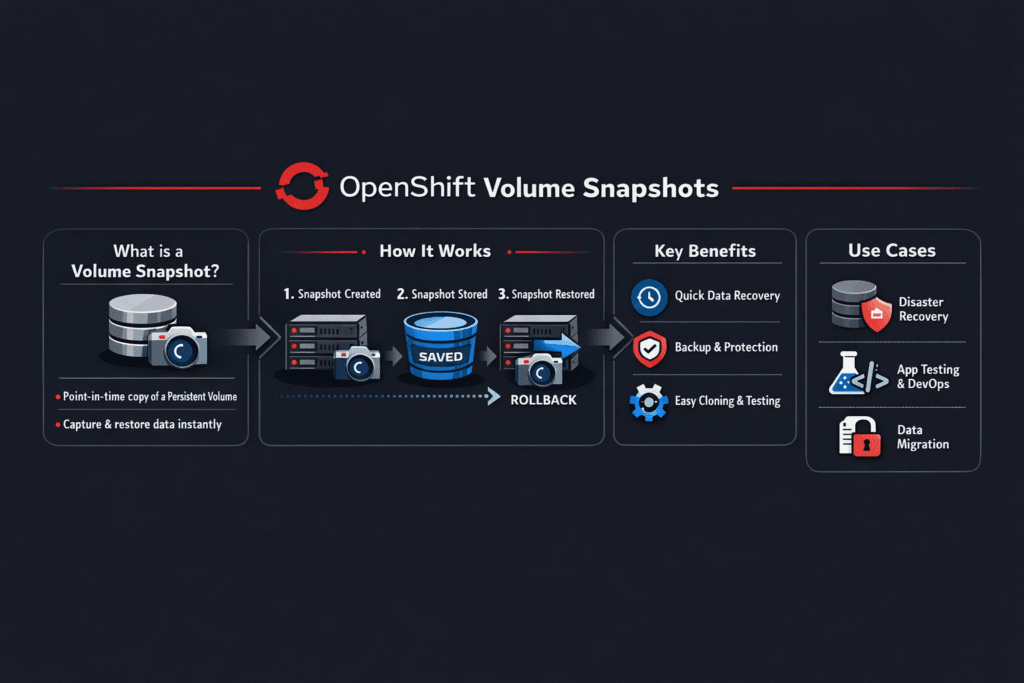
OpenShift Volume Snapshots create a point-in-time copy of a PVC so teams can roll back changes, test upgrades, and speed up restores. OpenShift stores snapshot intent in Kubernetes objects, and then the CSI driver executes the work on the storage system. This split matters because the API can look healthy while the backend struggles with space growth, copy-on-write churn, or slow snapshot deletes.
Stateful teams use snapshots to cut RTO and reduce risk during changes. A snapshot does not replace a full backup by itself, but it can power fast restore workflows when you pair it with retention, off-cluster copies, and clear runbooks.
What snapshot objects mean on OpenShift
OpenShift relies on three core objects: VolumeSnapshot, VolumeSnapshotClass, and VolumeSnapshotContent. The class selects the driver and passes parameters. The content tracks the real snapshot handle on the backend. OpenShift and Kubernetes treat these as CRDs, so snapshot support depends on a CSI driver that implements it.
For platform owners, the key control point is the snapshot class. It drives the deletion policy, default behavior, and any driver options that change snapshot cost. A small config choice can decide whether snapshots clean up fast or pile up until the backend hits a hard limit.
🚀 Run OpenShift Volume Snapshots with NVMe/TCP Block Storage, and Restore in Minutes
Use Simplyblock to standardize snapshot classes, speed up restores, and reduce rollback risk.
👉 Use Simplyblock for Kubernetes Backup and Snapshots →
OpenShift Volume Snapshots in Kubernetes Storage Operations
OpenShift Volume Snapshots sit inside the normal Kubernetes Storage lifecycle. Developers request a snapshot from a PVC. The cluster then coordinates controller-side snapshot work and node-side attach and mount flows when you restore into a new PVC. That flow touches scheduling, quota, and storage QoS, so teams should treat it as part of day-two operations, not as a “backup feature.”
Software-defined Block Storage helps when you want the same snapshot behavior across clusters and sites. It also helps when you need multi-tenant controls, because snapshots can amplify noisy-neighbor effects if one team spawns clones or keeps long retention without guardrails.
OpenShift Volume Snapshots and NVMe/TCP data paths
Snapshot speed and snapshot impact both depend on the I/O path. NVMe/TCP matters because it delivers low-latency block access over standard Ethernet, which fits many OpenShift environments. It supports disaggregated designs, where compute and storage scale on their own timelines, and it can reduce the penalty of “restore to a new PVC” workflows that spike reads.
An SPDK-based datapath can also reduce CPU overhead in the storage stack. That helps when a snapshot triggers extra metadata work, or when many pods hit the same backend during a restore window.
How to benchmark snapshot overhead the right way
Start with the workload, not a synthetic number. Measure baseline latency and throughput, then add snapshots at a realistic cadence, and re-measure. Watch p95 and p99 latency, because snapshots often raise tail latency first. Pair that with space growth and delete time, since slow cleanup can turn into long-term performance drag.
Also, test restores are a first-class scenario. A fast snapshot that restores slowly still breaks RTO. Run restore tests during busy hours at least once, because that’s when queueing and throttling surface.
One set of controls that improves snapshot consistency
- Use a dedicated snapshot class per tier so critical workloads do not share snapshot limits with dev and test.
- Set retention and deletion policy on purpose, then audit old snapshots on a schedule.
- Add QoS limits for noisy tenants so snapshot bursts do not crowd out production reads and writes.
- Validate NVMe/TCP network headroom before large restore drills, and re-check after cluster growth.
- Run restore tests that match your real app pattern, not only a “PVC-from-snapshot” happy path.
Comparison table – Snapshot options teams use on OpenShift
The table below compares common snapshot approaches, with a focus on operational control and performance risk.
| Approach | Strength | Trade-off | Best fit |
|---|---|---|---|
| CSI snapshots (native objects) | Clean API, fits GitOps | Depends on driver quality and backend limits | Most OpenShift app teams |
| App-level snapshots (DB tools) | App consistency control | More app work, more runbooks | Databases with strict rules |
| Storage-backend snapshots only | Fast on some arrays | Less visibility in Kubernetes | Legacy SAN alternative environments |
| Snapshot + backup pipeline | Stronger recovery story | More moving parts | Regulated, multi-cluster orgs |
Predictable snapshot workflows with Simplyblock™
Simplyblock supports Kubernetes Storage with NVMe/TCP and Software-defined Block Storage, so teams can run fast snapshot and restore workflows without locking into a SAN alternative design. It supports snapshot and clone patterns that fit platform operations, including clean rollback during upgrades and repeatable restore drills.
Simplyblock also uses an SPDK-based approach for an efficient I/O path. That design can help keep latency steady when snapshots add metadata pressure, and when restores push burst reads. Multi-tenancy and QoS controls help keep one team’s snapshot burst from turning into another team’s incident.
Snapshot automation trends that matter for OpenShift teams
Snapshot tooling keeps moving toward safer defaults and better policy. VolumeSnapshotClass settings already act like “snapshot tiers,” and more teams now treat them as part of platform standards.
Expect wider use of snapshot-driven backup pipelines, plus more focus on crash consistency across multiple volumes for complex apps.
Related Terms
Platform teams review these glossary pages with OpenShift Volume Snapshots when they design restore drills, retention policy, and snapshot-to-backup flows.
Questions and Answers
OpenShift Volume Snapshots capture point-in-time copies of persistent volumes, enabling backup, cloning, and rollback capabilities. They rely on CSI snapshot APIs and compatible storage backends. Simplyblock supports snapshot-ready Kubernetes storage, making it ideal for OpenShift workloads.
Snapshots are created by defining VolumeSnapshotClass and VolumeSnapshot objects. The CSI driver handles the actual snapshot operation on the backend. Simplyblock integrates with the Kubernetes CSI snapshot interface to enable OpenShift-native snapshot automation.
Yes. While OpenShift itself doesn’t provide scheduling out of the box, tools like Velero or custom CronJobs can be used. Pairing this with topology-aware storage ensures consistent snapshots aligned with zone-specific workloads.
Definitely. Volume snapshots are ideal for capturing consistent states of databases before upgrades or migrations. Simplyblock supports low-latency block volumes that integrate snapshot operations without performance degradation during workload execution.
Snapshots provide fast recovery options and are essential for disaster recovery strategies. You can clone a volume from a snapshot and redeploy quickly. Combined with secure volume management, this forms a robust DR plan in OpenShift environments.