NVMe over TCP for Kubernetes
Terms related to simplyblock
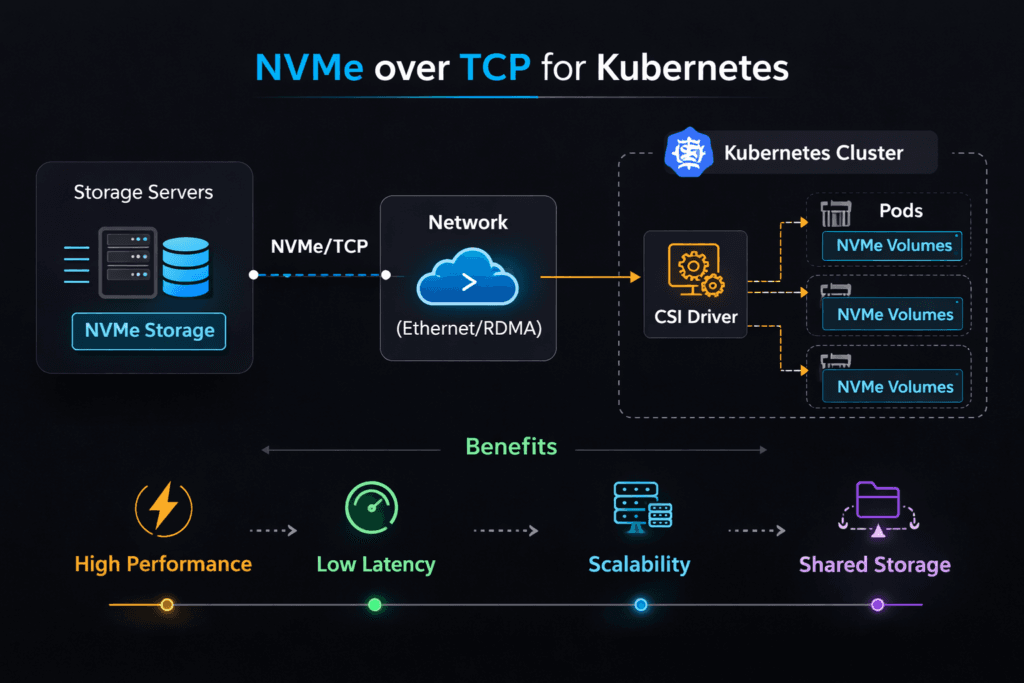
NVMe over TCP for Kubernetes describes a storage pattern where Kubernetes nodes access remote NVMe media using NVMe-oF commands carried over standard Ethernet with TCP/IP. Teams use it to get shared, low-latency block access without a dedicated SAN fabric. Latency, throughput, and CPU use depend on the whole path: the initiator host, the target host, the network, and the storage software.
Executives usually care about three outcomes: predictable app response times, simpler operations than legacy SAN, and a clear scale path. Platform teams care about day-2 behavior: upgrades, node drains, reschedules, and tenant isolation. Kubernetes Storage needs all of that to stay stable under churn. Software-defined Block Storage adds policy, QoS, and automation so the cluster can keep its performance goals when workloads mix and move.
Critical Factors That Shape NVMe/TCP Outcomes
Strong results come from making the I/O path boring and repeatable. CPU contention, noisy-neighbor traffic, and buffer pressure often cause more pain than raw link speed. A design that protects headroom will usually beat a design that chases peak numbers.
Keep your critical signals simple. Track p95 and p99 latency, IOPS, throughput, and CPU per I/O. Those metrics show whether the platform will scale cleanly or fall apart during busy hours. If p99 climbs while CPU climbs, the system likely fights for cycles. If p99 jumps while CPU stays flat, the network or queueing model often drives the spike.
🚀 Build a SAN Alternative for Kubernetes Storage Using NVMe/TCP
Use Simplyblock to simplify operations and protect tenants with Software-defined Block Storage controls.
👉 Use Simplyblock for NVMe/TCP Storage →
NVMe over TCP for Kubernetes Storage Topology
Most teams choose one of three layouts, then standardize it across clusters. A hyper-converged layout places storage services on the same nodes as workloads, which can cut hops for latency-sensitive apps. A disaggregated layout runs storage services on dedicated nodes, which improves pooling and makes capacity growth easier. A hybrid layout mixes both so the platform can match tiers to workloads.
Topology choices affect failure handling and performance isolation. Disaggregated designs often simplify blast radius, while hyper-converged designs can simplify data locality. In each case, Kubernetes Storage works best when the storage layer exposes clear volume semantics and predictable attach behavior. Software-defined Block Storage helps by enforcing quotas, tenant boundaries, and fairness rules that Kubernetes does not enforce on its own.
NVMe over TCP for Kubernetes and NVMe/TCP Data Path Basics
NVMe/TCP runs NVMe commands over the TCP/IP stack, so it benefits from common networking gear and simple routing. It also makes CPU planning a first-class requirement, because the host spends cycles on protocol processing and queue handling. Under load, CPU pressure can raise tail latency long before the network saturates.
Good teams treat the data path like a pipeline. They keep initiator and target hosts aligned to NUMA zones, and they avoid moving hot I/O work across sockets. They also prevent background work from stealing cores needed for I/O. Those practices reduce jitter and help NVMe/TCP keep steady percentiles.
Measuring Performance Without Fooling Yourself
Benchmarks should match the app shape, not a vendor demo. Use realistic block sizes, read/write mix, and concurrency. Report IOPS and latency percentiles in the same run, because each metric can hide the other. Tail latency tells you how the system behaves when queues build.
Kubernetes Storage needs operational tests as well. Run node drains, rolling updates, and reschedules during load. Watch what happens to p99 and to attach times. If p99 spikes during churn, the platform likely lacks headroom or isolation. Software-defined Block Storage can help when it provides QoS controls, better placement choices, and clear observability.
Practical Tuning Moves That Usually Work
Change one factor at a time, then re-test with the same workload. These steps tend to deliver the biggest gains:
- Reserve CPU for the I/O path on initiators and targets, and keep that allocation stable.
- Align threads and memory to the right NUMA zone, and avoid cross-socket traffic.
- Set queue depth to match the drive and the network, not the maximum your tool allows.
- Separate noisy tenants with QoS limits so one workload cannot crowd out the rest.
- Validate MTU, congestion control, and NIC offloads, then re-check p95 and p99.
Deployment Options Compared for Kubernetes Storage
The table below summarizes common choices teams compare when they build Kubernetes Storage that uses a SAN alternative model.
| Option | What teams like | What to watch | Typical fit |
|---|---|---|---|
| NVMe/TCP on Ethernet | Simple rollout, broad hardware support | CPU headroom, tail spikes under congestion | Most Kubernetes clusters |
| NVMe/RDMA on RoCEv2 | Very low tail latency in clean fabrics | Network discipline, ops complexity | High-priority latency tiers |
| iSCSI | Familiar workflows | Higher overhead at scale | Legacy estates |
| Local NVMe only | Lowest per-node latency | No pooling, weak mobility | Single-node apps |
Running NVMe over TCP for Kubernetes with Simplyblock™
Simplyblock™ focuses on a fast data path and the controls needed for shared clusters. Teams use it to run Kubernetes Storage on NVMe/TCP while enforcing multi-tenant QoS and predictable volume behavior. Software-defined Block Storage policy helps reduce noisy-neighbor impact, and it gives operators a consistent way to manage performance across hyper-converged, disaggregated, and hybrid deployments.
This approach supports executive goals as well. It reduces operational drag, it tightens latency percentiles, and it provides a clean scale path as fleets grow.
Future Directions for Cloud-Native NVMe/TCP
Teams will push NVMe/TCP toward lower CPU cost per I/O and tighter tail latency under mixed load. DPUs and IPUs will also matter more as platforms offload parts of the data path and free CPU for applications. Expect smarter policy engines that react to congestion signals and latency percentiles in real time, not static thresholds.
Kubernetes Storage will keep moving toward SLO-driven operations. Software-defined Block Storage will play a larger role as orgs demand repeatable performance across clusters, regions, and workload types.
Related Terms
Teams often pair these topics with NVMe over TCP for Kubernetes when they plan Kubernetes Storage on NVMe/TCP.
- NVMe over TCP Architecture
- Software-Defined Storage
- CSI (Container Storage Interface)
- Block Storage CSI
Questions and Answers
With NVMe/TCP, Pods ultimately talk to remote NVMe namespaces using the NVMe command set over Ethernet, which can reduce protocol overhead and tighten p99 latency versus iSCSI in high-IOPS cases. In Kubernetes, the real impact depends on how CSI stages/publishes devices and how node networking is configured. Map the full storage IO path in Kubernetes against your NVMe over TCP architecture.
The most common issue is poor CPU/NUMA and NIC-queue alignment on worker nodes, which turns NVMe/TCP into a CPU-queueing problem and inflates p99. It often looks like “storage is slow” while bandwidth is unused. Treat host tuning as part of the storage design and validate with NVMe over TCP CPU overhead plus storage latency vs throughput.
NVMe/TCP can amplify cross-zone penalties because latency becomes network-queueing driven under load. If Pods land far from their storage endpoints, p99 and jitter rise quickly even when the backend is healthy. Use topology-aware storage scheduling and align it with real storage fault domains vs availability zones so placement matches your failure and latency boundaries.
Benchmark inside Pods with production-like CPU limits, node selectors, and network policies, because the platform can add throttling and noisy-neighbor effects that don’t appear on bare metal. Focus on p95/p99 and CPU-per-IOPS as you sweep block size and queue depth. A reliable method is Fio NVMe over TCP benchmarking combined with storage performance benchmarking.
Track tail latency, retransmits, and CPU saturation on nodes hosting initiators, then correlate with attach/mount delays and Pod readiness events during churn. If p99 rises while storage utilization stays flat, the problem is usually fabric or host CPU scheduling, not media. Use storage metrics in Kubernetes and validate symptoms against storage network bottlenecks in distributed storage.