Fio Random vs Sequential IO
Terms related to simplyblock
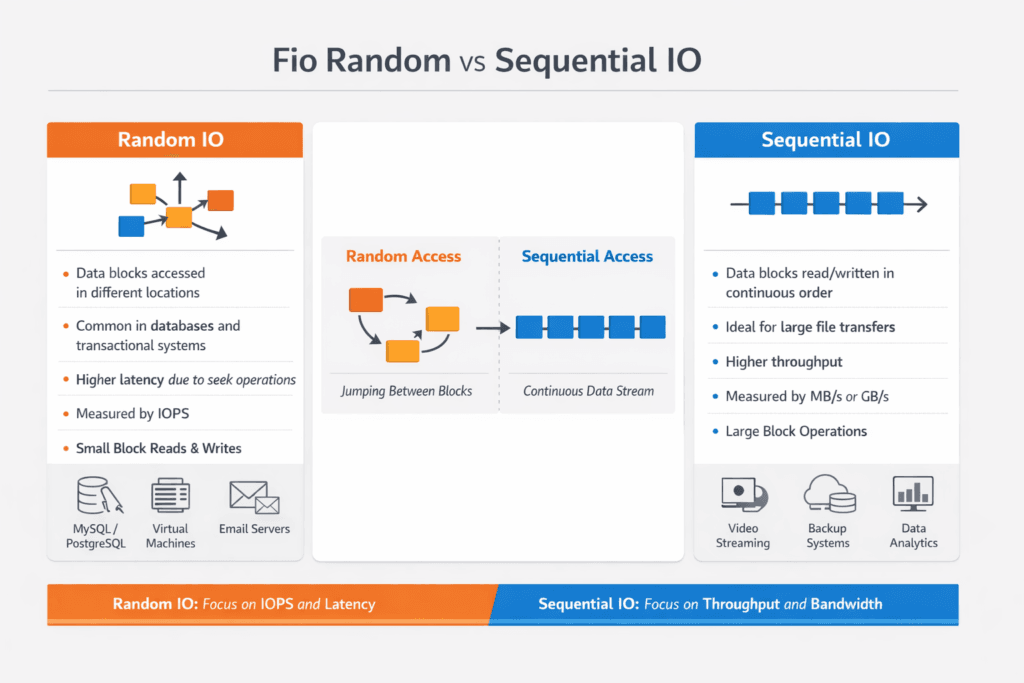
Fio Random vs Sequential IO describes two workload patterns you generate with fio to measure storage behavior under different access styles. Random I/O jumps across many logical block addresses, which stresses IOPS, queueing, and tail latency. Sequential I/O walks through blocks in order, which stresses throughput, readahead behavior, and sustained bandwidth.
Executives usually care because these patterns map to real business systems. OLTP databases, metadata services, and key-value stores lean toward small-block random I/O. Backups, scans, log replay, and analytics pipelines often lean toward large-block sequential I/O. Teams that choose the wrong pattern in FIO often buy the wrong storage, then run into cost and performance surprises in production.
DevOps and IT Ops teams use fio to answer three operational questions. Which storage profile supports our SLOs during peak? Where does the bottleneck land: device, CPU, or network? How much headroom do we need before noisy neighbors push p99 into a failure budget?
Tuning Fio Workloads for Real System Behavior
Fio can look “fast” while hiding the true bottleneck. Page cache can inflate reads, short tests can miss steady-state effects, and a tiny test file can fit in RAM. A useful fio plan forces the system to do real I/O, and it keeps variables stable across runs.
Random tests usually need small block sizes, higher parallelism, and careful queue-depth control. Sequential tests typically need larger blocks, enough outstanding I/O to fill the pipeline, and runtimes long enough to smooth bursty effects. Always match your test to the application path you plan to run, including filesystem mode versus raw block mode, encryption, and any replication or erasure coding overhead in the storage layer.
Software-defined Block Storage adds another variable: the distributed data path. It can shift the limit from the NVMe device to CPU scheduling, NIC queues, or east-west bandwidth. That shift matters in baremetal fleets that run stateful workloads next to high-churn platform services.
🚀 Test fio Random vs Sequential IO Across the NVMe/TCP Data Path
Use Simplyblock to measure host-to-volume performance, then tune block size and iodepth on Software-defined Block Storage.
👉 Use Simplyblock for fio NVMe/TCP Benchmarking →
Fio Random vs Sequential IO in Kubernetes Storage
Kubernetes Storage adds layers that can change fio outcomes, even when the backing media stays the same. The CSI driver path, mount options, and volume mode influence latency and throughput. Pod placement also affects results because topology can change the network hop count to the storage target.
Run fio where the workload runs. A fio job on a worker node with local NVMe can behave very differently from the same job on a different node that hits a remote pool over the storage network. Mixed clusters make this even more visible. Hyper-converged storage can reduce hops for some paths, while disaggregated storage can give you cleaner fault domains and separate scaling for compute and storage.
For executive reporting, keep the message simple: fio random results show your small-I/O ceiling and tail risk, and fio sequential results show your bulk-transfer ceiling. Kubernetes Storage success requires both when you run databases, streaming, and analytics on the same platform.
Fio Random vs Sequential IO and NVMe/TCP
NVMe/TCP can shift the economics of performance by using standard Ethernet while still supporting high parallelism and low overhead compared to older protocols. That matters because fio random workloads amplify per-I/O CPU work, and fio sequential workloads can saturate links quickly.
In NVMe/TCP environments, the bottleneck often moves between CPU and network depending on block size and iodepth. Small-block random tests tend to run into queueing and CPU cost first. Large-block sequential tests tend to run into bandwidth limits first, especially when multiple tenants share the same uplinks.
Software-defined Block Storage on NVMe/TCP also benefits from user-space data paths that reduce copy overhead. SPDK-style architecture can improve CPU efficiency and reduce jitter, which supports stronger p95 and p99 under mixed workloads. That matters when you replace a legacy SAN with a scale-out SAN alternative and still expect stable service levels.
Measuring and Benchmarking Fio Random vs Sequential IO Performance
A reliable fio benchmark plan stays consistent, blocks caching effects, and reports the right metrics. Use fixed block sizes, fixed read/write mixes, and a stable runtime. When you compare systems, keep the fio version, ioengine, and CPU pinning approach consistent.
What should you measure?
Measure IOPS, throughput, average latency, and tail latency (p95 and p99). Report CPU utilization and network utilization alongside fio output, or you can misread the limit.
How do you avoid misleading results?
Use test files larger than memory when you test file-backed workloads. Use direct I/O when you want device truth rather than cache truth. Run long enough to reach a steady state, and repeat runs to catch variance.
Which fio settings drive the biggest swings?
Block size, iodepth, and numjobs drive most of the curve. ioengine choice can also change the overhead. Treat those as first-class test inputs, not defaults.
Practical Ways to Improve fio Results
- Match block size to the app profile, such as 4K for OLTP-like random I/O and 128K for bulk sequential transfers.
- Set iodepth and numjobs to reflect real concurrency, then confirm the system keeps latency within SLO targets.
- Prevent cache tricks by using direct I/O where appropriate, and by sizing the working set beyond RAM.
- Keep Kubernetes placement stable with node selection and topology rules so runs remain comparable.
- Watch CPU and NIC queue pressure in NVMe/TCP tests because they often cap random IOPS before the media does.
I/O Performance Differences Across Storage Designs
The table below summarizes how common storage designs usually respond to random versus sequential fio workloads. Use it to align architecture choices with the mix you run in production.
| Storage Design | Random I/O Strength | Sequential I/O Strength | Common Bottleneck | Notes for Kubernetes Storage |
|---|---|---|---|---|
| Local NVMe (direct attached) | High IOPS, low latency | High bandwidth per node | CPU scheduling at high depth | Great for node-local state, harder to share safely |
| Distributed Software-defined Block Storage | Scales with nodes, needs QoS | Scales with the network and nodes | East-west bandwidth and CPU | Strong fit for multi-tenant clusters with policy control |
| Legacy SAN-style array | Consistent, but controller-bound | Strong streaming bandwidth | Controller queues | Works, but scaling can cost more than scale-out |
| NVMe/TCP disaggregated pool | Strong with tuned hosts | Very strong if links allow | Network and CPU | Clear separation of compute and storage, good for fleet scaling |
Simplyblock™ Controls for Fio Benchmarking Consistency
Simplyblock targets high I/O density in Kubernetes Storage by combining NVMe/TCP transport with an SPDK-based, user-space data path. That design reduces overhead per I/O, which helps both random and sequential fio profiles when you scale concurrency. It also fits Software-defined Block Storage goals because it supports multi-tenant policy, QoS, and clean isolation boundaries.
Operations teams usually run into trouble during mixed load, not during single-thread tests. Simplyblock addresses that reality with resource controls that prevent one workload from consuming the entire I/O budget. The platform also supports hyper-converged, disaggregated, and hybrid deployment models, so you can align topology with the workload mix and failure domain strategy.
For organizations moving away from a SAN, this approach supports a SAN alternative path that keeps the operational model closer to cloud patterns, while still using bare-metal performance where it matters.
Future Directions and Advancements in Fio Testing and Storage Systems
Fio testing keeps evolving alongside Linux I/O engines and storage stacks. io_uring adoption continues to grow for high-performance paths, and teams increasingly pin CPU and align NUMA to reduce jitter. DPUs and IPUs also change how platforms budget CPU for storage, especially in NVMe/TCP environments where protocol processing competes with applications.
Benchmarking practice is also getting stricter. More teams now test mixed patterns that combine random and sequential phases, because real systems rarely stay pure. Expect broader use of cluster-aware test runners that keep Kubernetes placement fixed and collect storage, CPU, and network telemetry in one pass.
Related Terms
Teams often review these glossary pages alongside Fio Random vs Sequential IO.
Dynamic Provisioning in Kubernetes
Snapshot vs Clone in Storage
Storage Controller
Storage Pools
Questions and Answers
In fio, sequential I/O (read/write) targets contiguous LBAs, so devices can prefetch and stream efficiently, usually maximizing MB/s. Random I/O spreads requests across the address space, stressing IOPS, FTL mapping, and latency. The key is that sequential often hides tail latency issues, while random exposes queueing and metadata overhead. Match the pattern to your production access style before comparing results.
The primary switch is rw=: used read/write for sequential and randread/randwrite/randrw for random. Then control request size with bs= a working-set spread with size= (and optionally offset_increment=). If you want results to represent storage, not cache, pair the pattern with direct=1 and a dataset larger than RAM. This aligns with good FIO storage benchmark practice.
Sequential workloads keep the device busy with efficient large transfers, so throughput stays high and per-IO overhead is amortized. Random workloads create more mapping work and increase internal fragmentation, so queues form faster, and p99 latency rises even when average latency looks acceptable. If you increase concurrency to “fix” random throughput, you often trade it for worse tail latency. See p99 storage latency for how to interpret that gap.
For sequential throughput, larger bs (e.g., 128K–1M) Moderate concurrency often reflects streaming behavior. For random IOPS, smaller bs (e.g., 4K–16K), with carefully tuned iodepth, show the IOPS/latency knee. Don’t reuse the same iodepth blindly—random I/O hits queue limits earlier. The best tuning method mirrors fio queue depth tuning for NVMe.
Fake sequential results usually come from filesystem cache or short runs that never reach a steady state. Fake random results often come from too-small datasets, alignment quirks, or mixing buffered and direct I/O across jobs. Use direct=1a consistent runtime with warmup, and a dataset that exceeds RAM. Then compare both IOPS/MB/s and p95/p99 latency so you don’t optimize for a metric your workload doesn’t care about.