Fio Kubernetes Storage Benchmarking
Terms related to simplyblock
Fio Kubernetes Storage Benchmarking is the practice of running fio inside a Kubernetes cluster to measure how your storage behaves under real pod-level I/O. Teams use it to size NVMe pools, validate StorageClass settings, and prove that latency stays stable when load rises. Executives care because storage drift shows up as missed SLOs and higher spend. DevOps and IT Operations care because repeatable fio runs shorten incident time and make capacity plans real.
fio can test block storage, file systems, and mixed I/O paths. The trick is to make the test match how your apps use Kubernetes Storage. A database that lives on random 4K writes will not react as an analytics job that streams 1M reads. Good benchmarking starts with a clear question, a matching job file, and clean test rules.
Turning Fio runs into storage decisions
Use fio to answer business-level questions with numbers. Teams often ask how many nodes a system can run before p99 jumps. Another key question is how much headroom is needed for rebuild, snapshots, and compaction. You may also measure how fast a node can be drained without stalling writes. Reliable answers depend on the full stack, not just the SSD spec.
A strong plan also separates the control plane from the data plane. CSI settings, topology rules, and scheduling shape the path that I/O takes. The NVMe path, the network, and the storage engine decide what the pods feel. Software-defined Block Storage makes this easier to test because you can keep the same app profile while you change the backend design.
🚀 Run fio Benchmarks on NVMe/TCP Volumes with the simplyblock CSI Driver
Use Simplyblock to deploy Kubernetes Storage fast, load the NVMe/TCP modules, and benchmark real PVC paths with fio.
👉 Install Simplyblock CSI for Kubernetes →
Fio Kubernetes Storage Benchmarking for Kubernetes Storage
Kubernetes Storage adds moving parts that classic SAN tests do not cover. Pods move. Nodes reboot. A PVC can attach to a new host in minutes. Your fio test should include that reality, or you will overestimate stability.
Start with where the workload runs. Hyper-converged layouts keep I/O closer to the app and often reduce east–west traffic. Disaggregated storage scales capacity and compute on their own, which fits larger clusters and multi-tenant setups. Both models can work on baremetal, and both can act as a SAN alternative when the platform delivers strict isolation and clear failure handling.
Also, decide what you test: raw block mode, file system mode, or both. Raw block mode shows the storage engine and NVMe path more directly. File system mode shows what many apps see in practice, including page cache effects and metadata cost.
Fio Kubernetes Storage Benchmarking on NVMe/TCP
NVMe/TCP matters because it sets the host CPU cost, the network path, and the queue behavior for remote NVMe. It also keeps deployments practical on Ethernet, which helps teams scale without specialty gear. When you run fio over NVMe/TCP, treat CPU and latency as first-class results, not side notes.
NVMe-oF adds fan-out. A single pod can hit multiple queue pairs and multiple storage targets. That can boost throughput, but it can also raise jitter if the stack wastes CPU per I/O. SPDK-style user-space, zero-copy design reduces that waste, so the cluster keeps more cycles for apps, parity, and background work.
If you plan to compare NVMe/TCP and NVMe/RDMA, keep the job files the same and only change the transport. That approach shows you what the fabric changes, not what the workload changes.
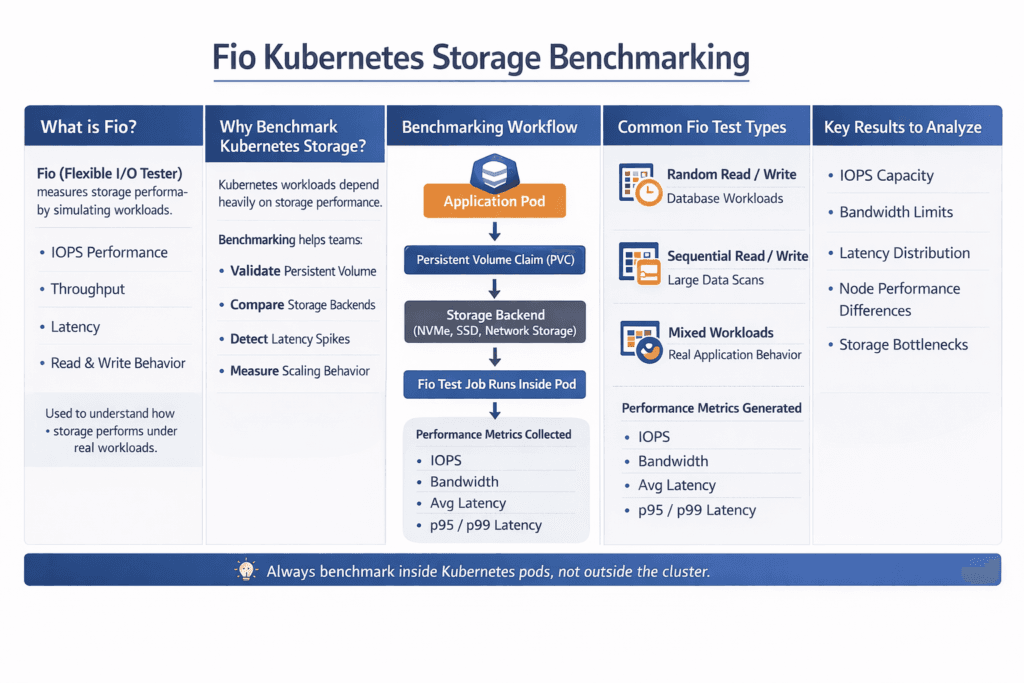
Reading latency, IOPS, and CPU from Fio Kubernetes Storage Benchmarking runs
Fio reports IOPS, bandwidth, latency, and time-based behavior, but you still need the right lens. Average latency can look fine while p99 breaks your SLO. Standard deviation can hide bursts when the system hits a noisy neighbor. CPU can cap performance even when NVMe has room left.
To keep the results fair across runs, use one consistent test routine:
- Pin the same pod spec, same limits, and same node placement rules for every run.
- Use time-based tests with a warm-up period, and record p50, p95, and p99.
- Run healthy tests, then repeat during a node drain or a controlled failure event.
- Track node CPU and network, along with fio output, and store the raw logs.
You can also validate the storage layer by watching how performance shifts as you add concurrency. When iodepth rises, and p99 stays flat, the data path has slack. When iodepth rises, and p99 jumps, you likely hit CPU, queue limits, or network contention.
Tuning the stack to raise Fio scores
Start with the job file, not the hardware. Many “slow storage” reports come from a bad profile, like too little concurrency, the wrong block size, or a cached file-system test. Set direct I/O when you want device truth. Use the right mix of reads and writes for the app class. Keep verification off unless you test data integrity impact on purpose.
Next, tune Kubernetes inputs. StorageClass choices shape performance through replication, erasure coding, and placement. Topology and affinity rules can improve data locality, which helps tail latency. QoS matters in multi-tenant clusters because it stops one job from starving another.
Then tune the storage engine. Shorter I/O paths reduce CPU per I/O. Better isolation reduces jitter. Clear rebuild limits protect latency during failure handling. Those are the knobs that keep Kubernetes Storage steady at scale.
Workload profile comparison for common Fio jobs
The table below maps common fio patterns to what they reveal. Use it to pick a profile that matches the app, then adjust queue depth and job count until you match real concurrency.
| fio profile | Typical block size | Read/write mix | What it models | Primary signal |
|---|---|---|---|---|
| Random read | 4K | 100/0 | Cache misses, index scans, KV reads | p99 latency |
| Random write | 4K | 0/100 | WAL, commit logs, small writes | p99 latency, CPU |
| Mixed random | 4K | 70/30 | OLTP databases, search workloads | p95/p99, jitter |
| Sequential read | 1M | 100/0 | Backup, restore, scan jobs | Throughput |
Simplyblock™ controls for repeatable benchmarks
Repeatable fio results require more than fast media. You need a stable data path, clear isolation, and a policy that does not drift across clusters. Simplyblock aligns with that need by focusing on NVMe/TCP, Kubernetes Storage, and Software-defined Block Storage in one platform, while keeping the I/O path lean with SPDK-based design choices.
Multi-tenancy and QoS help platform teams run benchmarks without wrecking shared clusters. Those controls also help production apps hold latency targets while background work runs. Mixed deployment models matter here, too. You can run hyper-converged nodes for local speed, disaggregated pools for scale, or both, and keep a single operating model.
What changes next in storage benchmarking
Benchmarking will get more tied to observability and policy. Teams already track p95 and p99 in dashboards, and they will push those targets into automation. Storage stacks will also move more work into offload paths, using DPUs and IPUs to protect the host CPU for apps. That shift matters most on NVMe/TCP fabrics, where the CPU can decide tail latency.
Kubernetes will keep adding storage features, and the test plan must keep up. Expect more focus on topology rules, attachment behavior during drains, and multi-tenant fairness. fio will still do the load generation, but platform teams will judge success by SLO outcomes, not by peak IOPS.
Related Terms
Teams often review these glossary pages alongside fio Kubernetes Storage Benchmarking.
Storage Metrics in Kubernetes
IO Path Optimization
IO Contention
Kubernetes Block Storage
Questions and Answers
Run fio inside a pod that mounts the target PVC, and keep the job pinned to the same node class you run production on. Use direct=1a dataset larger than RAM, and fixed runtime + warmup so you avoid page-cache wins. Capture StorageClass parameters, node type, and CSI driver version with the results. This is the core of fio Kubernetes persistent volume benchmarking.
Treat fio as a workload model, not a max-IOPS button. Lock rw, bs, iodepth, numjobs, and fsync/fdatasync behavior to match the app. Use time_based=1, add ramp_time, and avoid tiny size values that fit into cache. If results swing between runs, you’re likely measuring node noise, not storage.
If IOPS plateaus while p99 latency climbs and node CPU/softirq rises, you’re probably host-limited. If node CPU is steady but device or network latency climbs with load, you’re backend-limited. Correlate fio latency with kubelet/node signals, because lifecycle churn and mount reconciliation can add jitter. The Kubelet Volume Manager is often the hidden culprit on busy nodes.
Benchmark both with the same fio job file, pod resources, node pool, and test window. Only change the StorageClass, you’ll accidentally compare “different nodes” instead of “different storage policies.” Record p95/p99 latency, not just MB/s, because policies like replication/compression can look identical at average load but diverge under contention.
Always report IOPS, throughput, and p95/p99 latency together, plus a short note on the access pattern (random/seq, block size, sync). Add node CPU/softirq and any throttling or retry signals so readers can see whether results are storage-limited or node-limited. A good template aligns with storage metrics in Kubernetes, so comparisons stay consistent across clusters.