Cold Storage Tier
Terms related to simplyblock
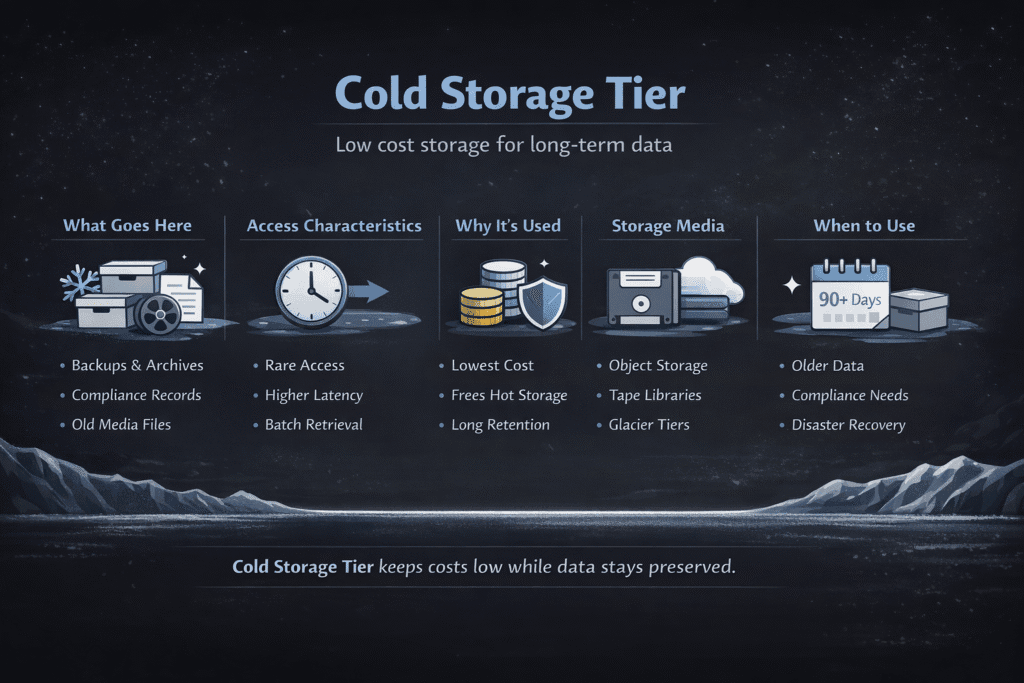
A Cold Storage Tier stores data that you need to keep, but you almost never read. It cuts your $/GB by moving “quiet” data off premium storage and into cheaper media or object storage. In return, you usually pay more to access that data, and restores can take longer than your hot path.
Teams use cold tiers for backups, old logs, compliance records, and historical datasets. The goal stays simple: keep hot data fast, keep cold data cheap, and make restores predictable.
What Counts as “Cold” Data
Cold data sits idle most of the time. You might keep it for audits, long-term history, or “just in case” recovery, but your apps do not need it on the critical path. Many cloud platforms offer tiers that lower storage cost while increasing access charges and adding minimum storage periods.
Treat “cold” as a behavior label, not a file type. If your access pattern changes, the right tier changes too, so you want rules that can adapt without a manual migration project.
🚀 Tier Cold Data to Cheaper Storage Without Slowing Your Hot Path
Use Simplyblock to move infrequently used blocks to lower-cost tiers while keeping active data on fast NVMe, so cost drops without app changes.
👉 Use Simplyblock for AWS Storage Tiering →
The Cost Tradeoffs That Matter
Cold tiers usually reduce monthly storage spend, but they can raise costs in other places. Reads can incur request fees, retrieval fees, and data egress charges, so an unexpected restore storm can turn “cheap storage” into an expensive week.
Minimum retention rules also matter. For example, Azure notes minimum storage durations for cold and archive tiers (90 and 180 days, respectively), which affects how you model lifecycle policies.
Cold Storage Tier in Kubernetes Storage
Kubernetes makes cold tiering practical when you separate “run” data from “keep” data. Your StatefulSets and PVCs usually run on block storage, while your cold copies often live in object storage as backups, exports, or snapshots. The cleanest setups keep app I/O on fast volumes and move older blocks or backup artifacts to cheaper tiers.
A good Kubernetes design also avoids silent drift. Define where cold data must land, how you restore it, and who owns restore testing, so you don’t discover gaps during an outage.
Designing Hot–Warm–Cold Data Paths That Don’t Break Apps
Most teams start with a three-layer mental model: hot for active reads/writes, warm for steady but less critical data, and cold for long-term keep. The most useful tiering stays transparent to the app, because app changes slow adoption and increase risk. Simplyblock describes tiering patterns where hot data stays on NVMe, warm data uses block storage, and cold data moves to object storage like S3.
You also need a “map” for restores. Keep metadata, indexes, and pointers easy to query on a faster tier, so you can find and rehydrate the right data fast.
NVMe/TCP as the Hot Path, While Cold Data Moves Out
NVMe/TCP helps when you want fast block storage over standard Ethernet, especially for Kubernetes and disaggregated designs. It gives you a strong hot tier for databases and latency-sensitive apps, while tiering logic pushes old or rarely read blocks away from expensive capacity. Simplyblock positions NVMe/TCP storage for Kubernetes with tiering as a way to keep performance high while reducing cost.
This split also reduces waste. Instead of buying premium IOPS for an entire volume, you keep only the active working set on the fastest tier.
Measuring Cold Storage Tier Performance
Cold tiers do not win on raw latency, so measure the right things. Start with rehydration time (how long it takes to restore data into a usable tier), then track throughput during restore and the time to first byte. Azure calls out that archive is an offline tier with retrieval on the order of hours, while cold stays online but optimizes for rarely accessed data.
Also measure cost signals. Track retrieval frequency, request count, and egress volume, because cold tiers shift spend from “store” to “access.” If your access pattern changes, your best tier changes too.
Operational Checklist for Stable Cold Tiering
- Classify datasets by access pattern (daily, weekly, quarterly, never) and set a rule for each.
- Keep the “directory” hot: indexes, manifests, and restore metadata should stay easy to read.
- Define restore targets (RTO/RPO style) and run restore drills with real data sizes.
- Watch retrieval and egress costs, not just $/GB, and alert on spikes.
- Set minimum retention and deletion rules so you avoid surprise early-delete charges.
Cold Tier Options Compared – Cost, Access, and Restore Time
Use this table to pick a tier that matches how often you read the data and how quickly you must restore it. It also highlights the common trap: cheap storage that becomes expensive when you pull data back often.
| Tier type | Typical access | Cost shape | Best for | Common gotcha |
|---|---|---|---|---|
| Hot NVMe / local cache | Sub-ms to ms | Higher $/GB | Active DB + app working set | Easy to overprovision |
| Warm block volumes | ms | Medium $/GB | Steady state, larger active sets | Costs climb with IOPS tiers |
| Cold object “online” tiers | ms to higher jitter | Low $/GB + higher access fees | Long-lived backups you rarely read | Retrieval fees surprise teams |
| Archive object tiers | minutes to hours | Lowest $/GB + higher restore fees | Compliance archives, deep history | Restore time can break RTO |
Keeping Cold Tiers Cheap and Hot Data Fast with Simplyblock
Simplyblock positions tiering as a way to stop paying premium rates for inactive blocks. In AWS-focused setups, Simplyblock automatically moves data between local NVMe, EBS, and S3 based on access patterns, so hot blocks stay fast while cold blocks shift to cheaper storage.
This approach fits teams who want one storage layer across environments. You keep your Kubernetes volumes predictable and still push cold data out of the expensive tier before it bloats your bill.
Where Cold Storage Tiering Is Headed Next
Teams now want tiering that feels automatic and safe. Expect more policy-driven placement, better “restore observability,” and tighter cost controls that forecast the bill impact before you rehydrate a big dataset. Cloud providers also keep expanding tier choices, so your strategy should stay flexible.
The winning platforms will make tiering boring. When restores stay repeatable, and costs stay visible, cold tiers become a default, not a special case.
Related Terms
Teams often read these alongside Cold Storage Tier when they plan tiering rules, media choices, and real TCO.
Questions and Answers
A cold storage tier is designed for infrequently accessed data, offering lower cost at the expense of access speed. It’s ideal for archival, backups, or compliance data and plays a key role in cloud cost optimization strategies.
By automatically moving unused or historical data to a lower-cost cold tier, organizations can dramatically reduce storage expenses. This is especially effective in software-defined storage environments with tier-aware data management.
Yes, cold storage can be integrated with Kubernetes workloads using tiered CSI drivers or policies. It enables dynamic data tiering without disrupting persistent volume access or application performance.
While NVMe over TCP is optimized for hot and active data, cold storage tiers are often backed by cheaper HDD-based infrastructure. Tiering between NVMe and cold storage enables both performance and cost efficiency.
Hot tiers serve active data with high-performance storage like NVMe. Cold tiers use low-cost, high-capacity media for rarely accessed data. Warm tiers balance cost and performance. Tiering across them supports efficient cloud-native storage management.