Hot vs Cold Data
Terms related to simplyblock
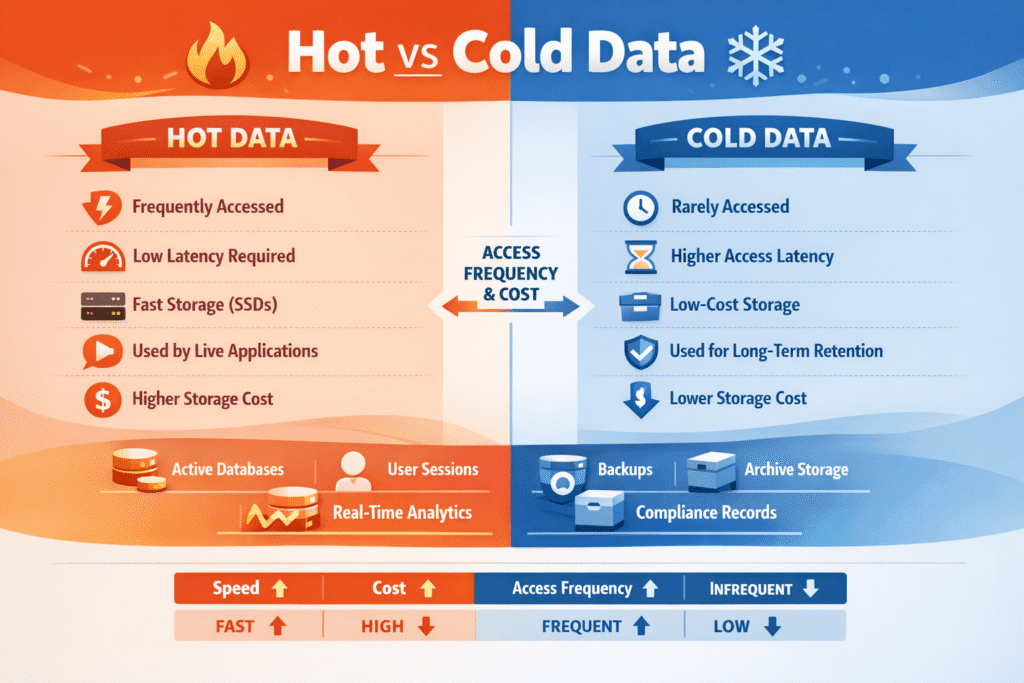
Hot data is the data your app touches all the time—active database pages, current indexes, sessions, queues, and “today’s” logs. Cold data refers to the information you retain for historical purposes and safety, including older partitions, archives, snapshots, and long-term audit trails. Most teams store far more cold data than hot data, but hot data still drives user experience because it sits on the critical path.
When hot and cold data share the same tier, cold data can negatively impact the hot path. A restore, a big scan, or a rebuild can steal bandwidth and push p95/p99 latency up. Costs also rise when you keep rarely used data on premium media.
Optimizing Hot vs Cold Data with Tiering and Clear Policies
Start with behavior, not labels. Track how often data gets read, how recently it got touched, and whether jobs read it in short bursts or long scans. Then set simple rules that place data on the right tier.
Tiering should feel boring and steady. Apps should not slow down just because a cache misses or a batch job runs. Aim for a clear split: keep the hot set fast and stable, and move cold capacity to cheaper tiers without breaking the app.
Policies matter as much as hardware. When you define “hot” in plain terms and enforce it, teams stop guessing and performance becomes easier to predict.
🚀 Keep Hot Data Fast While Tiering Cold Data Automatically
Use Simplyblock to keep frequently accessed (hot) data on NVMe and move infrequently accessed (cold) data to cheaper tiers with policy-based AWS storage tiering—so you cut cost without slowing the hot path.
👉 Use Simplyblock for AWS Storage Tiering →
Hot vs Cold Data in Kubernetes Storage Environments
Kubernetes makes storage easy to consume, but it also adds motion. Pods move, nodes drain, and clusters rebalance. Those changes can shift I/O paths even when the app stays the same.
Use StorageClasses as the contract. Give each class a clear goal, like “low-latency hot volumes” or “low-cost cold retention.” Then align apps to the right class so hot workloads do not compete with cold jobs.
Placement also matters. If a pod runs in one zone while the volume sits in another, every I/O crosses that zone link. That extra hop often adds jitter and makes p99 worse during busy hours. Zone-aware volume placement helps you keep the hot path close to the compute.
Hot vs Cold Data and NVMe/TCP at Scale
NVMe/TCP lets you run NVMe-style storage over standard Ethernet. It can deliver strong latency and throughput without special network gear, which makes it a solid fit for scale-out designs.
Hot data benefits when you tune the full path. Loss, mixed MTU, and link crowding can turn a fast system into a jittery one. Cold flows can also flood the fabric. A large restore or scan can push hot latency up even if average latency looks fine.
Treat NVMe/TCP like a system. Protect bandwidth, keep traffic steady, and stop cold jobs from taking over shared queues.
Measuring and Benchmarking Hot vs Cold Data Performance
Benchmark for user impact, not peak numbers. Average latency hides pain because short spikes trigger retries, timeouts, and slow queries.
Run two tests for every big change. First, run a clean test that measures the hot workload by itself. Next, run a mixed test that adds cold pressure at the same time—large reads, backups, or rebuild traffic. Watch p95 and p99 closely. If those jump during the mixed run, your tiers still share too much of the same path.
Also, test on real data sizes. Many workloads look great while the working set fits in cache, then slow down fast when data spills beyond it.
Approaches for Improving Hot vs Cold Data Performance
- Classify data by access pattern using simple signals like “reads per hour” and “days since last access.”
- Put hot and cold data on separate tiers or StorageClasses so cold scans do not share the same latency budget.
- Keep volumes close to pods with zone-aware placement to reduce cross-zone hops and jitter.
- Limit noisy neighbors with per-volume or per-tenant caps on IOPS and bandwidth.
- Schedule cold jobs on purpose and cap their impact so they cannot flood the fabric.
- Re-run mixed tests after changes to node types, kernel versions, NIC settings, or storage versions.
Comparison table – Hot vs Cold Data in Real Clusters
In real clusters, hot and cold data often share the same nodes, networks, and rebuild windows, so “good averages” can still hide painful spikes. This table shows the tradeoffs teams see when they split tiers, tune limits, and plan for mixed workloads.
| Attribute | Hot Data | Cold Data |
|---|---|---|
| Typical access | Frequent, bursty, latency-sensitive | Rare, batch-friendly, delay-tolerant |
| Common examples | Active tables, indexes, queues, session state | Archives, old partitions, backups, audit logs |
| Best-fit media | Fast NVMe and low-jitter network block | Cheaper SSD tiers, capacity SSD, object/archive tiers |
| Main risk | Tail spikes under contention | Slow restores and long scan times |
| Best control | QoS + placement + stable network | Tier rules + bandwidth caps |
| Primary goal | Stable p95/p99 | Lowest cost per TB |
Simplyblock’s Approach to Predictable Hot vs Cold Data Tiering
Simplyblock helps teams keep hot-path latency steady while they grow cold capacity at a lower cost. The approach stays simple: define tiers clearly, enforce them in the storage layer, and keep cold work from stealing the hot path.
This matters most in shared Kubernetes clusters. Backups, rebalances, and batch analytics can collide with user-facing traffic when everything shares the same pipes. With stronger isolation and policy-driven control, teams see fewer surprise spikes and more repeatable results, even during maintenance windows.
A practical next step is to map one hot StorageClass for latency-sensitive volumes and one cold tier for retention, then validate the split with a mixed workload test.
What’s Next for Hot vs Cold Data – Smarter Tiering and Automation
Hot vs cold data management is moving from manual rules to heat-aware automation. Platforms now track real access patterns and move data sooner, with fewer surprises. More teams also use more than two tiers because real datasets cool at different speeds.
Expect tighter links between scheduling, storage policy, and metrics. When the platform can see heat, spot contention, and apply limits by default, hot performance stays steady without constant tuning.
Related Terms
Teams often review these glossary pages alongside Hot vs Cold Data when they set tiering rules, protect the hot path, and keep cold jobs from causing latency spikes.
Questions and Answers
Hot data is frequently accessed and requires high-performance storage like NVMe over TCP. Cold data is rarely accessed and can be stored on slower, cost-effective media—ideal for cloud cost optimization.
Separating hot vs cold data helps reduce costs and improve performance. Hot data gets fast access, while cold data is moved to lower-cost storage, which is a key feature of tiered storage strategies in cloud environments.
Software-defined storage systems can automatically classify and tier hot and cold data. They use policies or access patterns to move data between fast SSDs and slower HDD-based cold tiers.
Yes, Kubernetes stateful workloads often generate both hot (active databases) and cold (logs, backups) data. Tier-aware storage solutions help optimize both performance and cost.
While not mandatory, NVMe over TCP is commonly used for hot data due to its high IOPS and low latency. It’s ideal for workloads needing fast response, while cold data can reside on more affordable storage media.