Incremental Backup vs Differential
Terms related to simplyblock
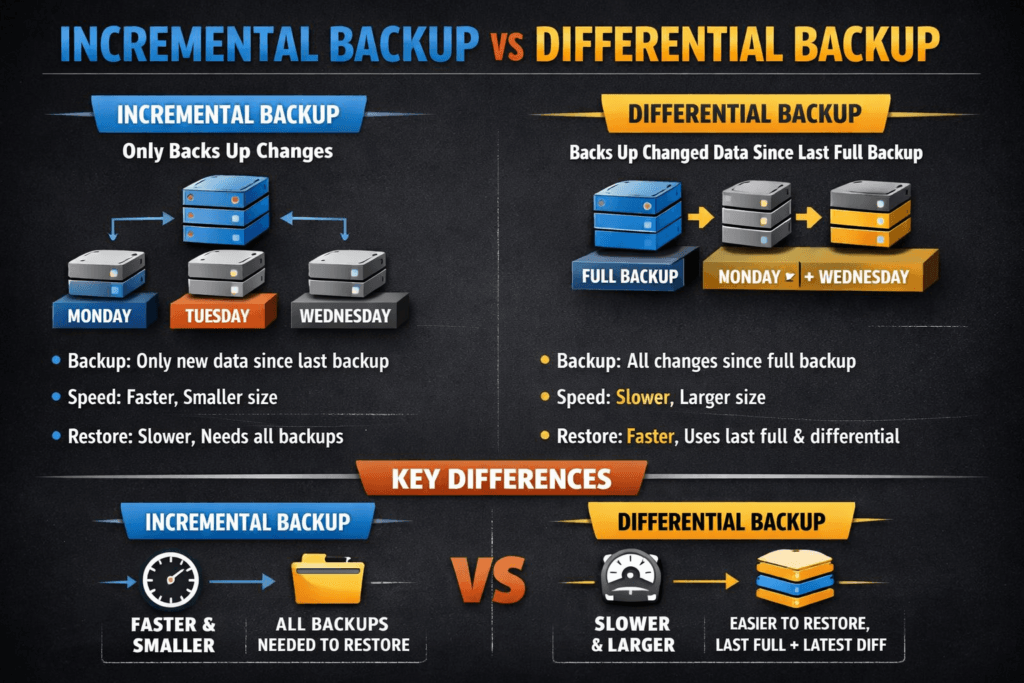
Incremental backup copies only the data that changed since the last backup job (full, incremental, or differential). Differential backup copies all data that changed since the last full backup.
This choice shapes two outcomes that executives track: the backup window (how long backups run and how much load they add) and the restore chain (how many backup sets you must apply to recover). Incremental jobs usually stay small and fast, while differential jobs grow larger until the next full backup.
Optimizing Incremental Backup vs Differential with modern storage controls
Teams get the best results when they tie backup type to data change rate and recovery targets. Incremental backups often fit high-churn systems because they reduce daily write load and storage use. Differential backups often fit systems with tight restore-time goals because they shorten the restore chain.
Modern platforms also reduce risk by adding guardrails around scheduling, isolation, and verification. In practice, Software-defined Block Storage can help by applying policy per workload tier, enforcing QoS, and keeping backup IO from colliding with production IO during peak hours.
🚀 Keep Backup Chains Short and Restores Fast in Kubernetes
Use Simplyblock to run snapshot-led backups on NVMe/TCP with predictable IO and clean recovery paths.
👉 Use Simplyblock for Kubernetes Backups →
Incremental Backup vs Differential in Kubernetes Storage
In Kubernetes Storage, the backup strategy depends on how you capture a consistent point in time for Persistent Volumes and how you move that data off-cluster. CSI volume snapshots often act as the capture layer, while backup tooling handles retention, encryption, and restore workflows.
Incremental patterns map well to clusters that change often because they keep each run small. Differential patterns work well when teams want fewer restore steps for critical namespaces. Either way, operators should test restores under realistic conditions, including rollouts and node drains, because those events expose timing and ordering issues that simple lab tests miss.
Incremental Backup vs Differential and NVMe/TCP
Backup jobs compete with application IO, so the data path matters. NVMe/TCP can shorten backup windows by moving more IO over standard Ethernet without forcing a specialized network. That helps most in disaggregated setups where many nodes share the same storage service.
CPU efficiency also matters, especially during snapshot creation, checksum work, compression, resync, or large-scale restore tests. SPDK-style user-space IO reduces overhead in the hot path, which can preserve headroom for production workloads when backup activity spikes.
Measuring and benchmarking backup and restore performance
Measure backup performance with metrics that match business outcomes. Track backup duration, storage growth over the backup cycle, and the impact on p95 and p99 latency for the application. For restore, track time to first byte, full restore duration, and the number of artifacts needed to reach the target recovery point.
Run the same workload over the same time span for both approaches. Use a write pattern that reflects your real change rate, then compare job runtime, total storage consumed, and restore time for the same recovery point. Also, run a failure-style drill where you restore into a clean environment, because restore paths often reveal hidden bottlenecks.
Practical ways to improve backup reliability and speed
Backup succeeds when teams treat it like a production workload and enforce repeatable rules. The actions below often deliver the largest gains (this is the only list on this page):
- Set clear RPO and RTO targets per workload tier, then choose schedules that meet them.
- Keep backup IO isolated with QoS so large jobs do not crush latency-sensitive services.
- Use snapshots for fast capture, then export backup data off-cluster for retention.
- Test restores on a schedule, including full environment recovery for critical apps.
- Watch storage growth across the cycle, because differentials can expand quickly.
Side-by-side comparison of backup behavior
The table below compares the two methods across the factors that drive cost, risk, and recovery time in Kubernetes Storage and Software-defined Block Storage operations.
| Factor | Incremental backup | Differential backup |
|---|---|---|
| Data captured | Changes since the last backup job | Changes since the last full backup |
| Backup size over time | Stays smaller across the cycle | Grows until the next full backup |
| Backup runtime | Usually shorter | Often increases as changes pile up |
| Restore chain | Full + all incrementals in order | Full + latest differential |
| Restore speed | Often slower for long chains | Often faster due to fewer steps |
| Chain risk | One missing set can block recovery | Fewer sets reduce chain risk |
| Best fit | Tight backup windows, frequent runs | Faster restores, simpler recovery |
Keeping backup windows consistent with Simplyblock™
Simplyblock™ helps teams keep backup behavior steady by controlling IO impact and protecting tail latency during heavy write periods. Simplyblock supports Software-defined Block Storage with policy controls such as multi-tenancy and QoS, which helps platform teams prevent “backup storms” from affecting production workloads.
For Kubernetes operators, consistent backups require more than raw throughput. Teams need fast snapshot actions, stable latency under load, and clean restore paths that hold up during real incidents. With NVMe/TCP, simplyblock can support high-throughput backup and restore flows over standard Ethernet while maintaining predictable behavior for the hot path.
Where is the backup strategy heading next?
Backup tooling continues to move toward simpler restore chains, more automation, and audit-ready reporting. More teams now blend snapshots, log-based recovery, and scheduled drills to reduce manual steps during an outage. In Kubernetes Storage, this trend increases the value of consistent snapshot handling and repeatable restore workflows across clusters.
On the infrastructure side, DPUs and IPUs will offload more data-path work, such as encryption and packet handling. Storage stacks that keep CPU overhead low will handle backup bursts and restore tests with less impact to production workloads, especially in multi-tenant environments that share nodes and networks.
Related Terms
Teams often review these glossary pages alongside Incremental Backup vs Differential when they set targets for Kubernetes Storage and Software-defined Block Storage.
- CSI Snapshot Controller
- CSI External Snapshotter
- Kubernetes Volume Health Monitoring
- Cross-Zone Replication
Questions and Answers
Incremental backups store only changes since the last backup of any type, while differential backups store all changes since the last full backup. Incremental is more efficient in terms of storage and time, especially for Kubernetes backup use cases where frequent changes occur.
Incremental backups are faster because they copy less data—only what has changed since the last backup. Differential backups grow over time, slowing down as more data is stored. For cloud-native storage, incremental methods reduce load and improve recovery flexibility.
Incremental backup is better for minimizing backup time and storage, while differential offers faster recovery since it requires fewer steps to rebuild data. For workloads focused on RPO and RTO reduction, the right choice depends on backup frequency and performance needs.
Simplyblock supports advanced snapshotting that enables incremental backups by default. This allows efficient data protection with near-instant volume recovery, ideal for databases, Kubernetes, and high-change environments.
Incremental backups are more storage-efficient because they store the least amount of changed data. Over time, differential backups grow larger until the next full backup. In software-defined storage, using incremental snapshots ensures better scalability and faster backups.