Kubernetes Storage Performance
Terms related to simplyblock
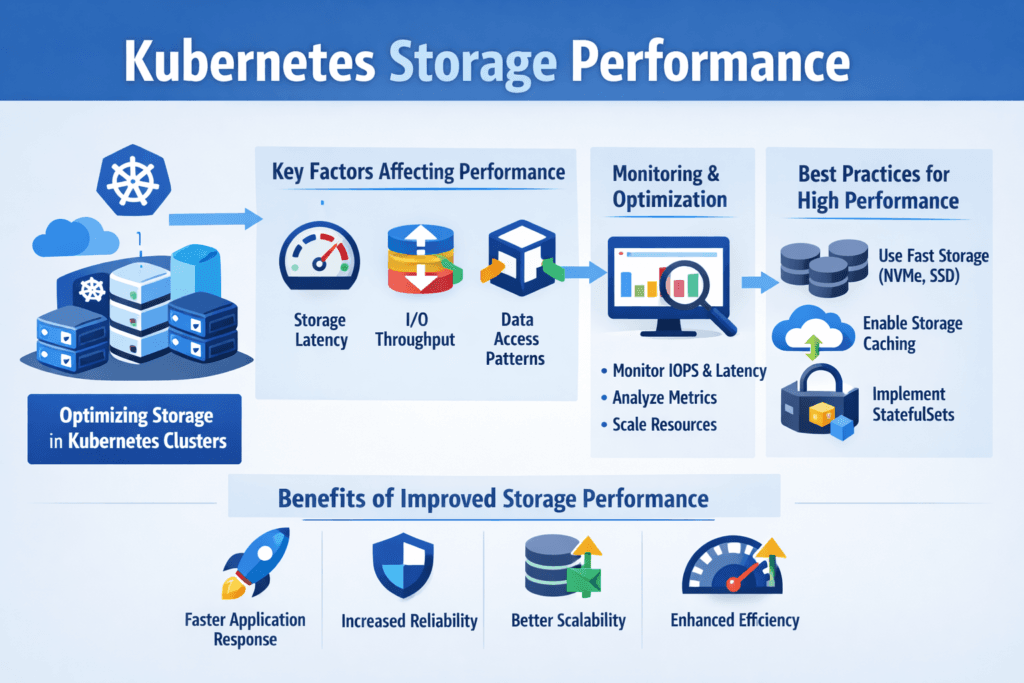
Kubernetes Storage Performance describes how fast and how consistently pods can read and write persistent data. Most teams judge it by p95 and p99 latency, sustained IOPS, throughput, and how much those numbers drift during reschedules, node pressure, or failovers. In Kubernetes Storage, the storage layer has to keep up with scheduler-driven churn, mixed workloads, and multi-tenant contention, which makes tail latency a better signal than averages.
The “performance path” includes the application I/O pattern, filesystem choices, CSI behavior, networking, and the backend that provides Software-defined Block Storage. When any one layer adds queueing or CPU overhead, p99 latency rises first, and SLOs start to slip.
Design Choices That Raise Kubernetes Storage Throughput and IOPS
High throughput and IOPS come from short I/O paths, predictable queues, and efficient CPU use. NVMe media helps, but Kubernetes clusters often lose the advantage when the stack adds kernel context switches, extra copies, or noisy interrupts. User-space storage stacks reduce that overhead and keep latency tighter under concurrency, which becomes more important as the node count and the number of stateful pods increase.
Architecture also matters. Hyper-converged layouts cut network hops, while disaggregated layouts improve pooling and utilization. In both cases, Kubernetes Storage benefits when the platform applies policy-driven placement, keeps background rebuild work from colliding with production traffic, and enforces tenant isolation at the I/O level.
🚀 Improve Kubernetes Storage Performance with NVMe/TCP, Natively in Kubernetes
Use simplyblock to keep persistent I/O consistent and reduce tail-latency spikes at scale.
👉 Improve Kubernetes Storage Performance with simplyblock →
Kubernetes Storage Performance in Kubernetes Storage
Kubernetes Storage Performance behaves differently from VM-era storage because pods move and volumes follow rules. A pod can land far from its volume, a StorageClass can default to conservative settings, or a CSI driver can serialize operations under load. Those issues show up as latency spikes during deployments, node drains, and autoscaling, even when the storage backend looks “healthy.”
Topology-aware placement reduces these penalties. Storage affinity, node affinity, and scheduling constraints help keep I/O local enough to avoid extra hops and queueing.
Kubernetes Storage Performance and NVMe/TCP
NVMe/TCP brings NVMe-oF semantics over standard Ethernet, which makes it practical for many data centers and cloud environments that want NVMe-class performance without specialized fabrics. For Kubernetes Storage, NVMe/TCP often provides a clean path to scale-out throughput while keeping operations familiar to networking teams.
NVMe/TCP also pairs well with Software-defined Block Storage because it supports pooled capacity, automated provisioning, and flexible deployment models. When the data plane runs in user space, the platform can reduce CPU cycles per I/O and keep tail latency steadier as concurrency increases.
Measuring and Benchmarking Kubernetes Storage Performance
Benchmarking fails when teams test only raw devices or only a single pod. A useful plan separates device limits, storage service limits, and end-to-end pod behavior. fio remains the common tool for block-level tests, but the value comes from choosing the right profile, including block size, queue depth, concurrency, and read/write mix, then tracking p95 and p99 latency alongside IOPS and throughput.
Repeat tests during real Kubernetes events. Drain a node, reschedule pods, scale replicas, and run background maintenance to see how much the numbers drift. Add observability so you can correlate latency jumps with network drops, CPU saturation, or throttling. OpenTelemetry helps unify traces, metrics, and logs across services.
Approaches for Improving Kubernetes Storage Performance
Use this short checklist to improve results without guessing:
- Match the transport to the workload: NVMe/TCP for broad Ethernet compatibility, and NVMe/RDMA when you run an RDMA fabric and need the lowest tail latency.
- Set StorageClasses with explicit intent, including topology rules and parameters, instead of relying on defaults.
- Enforce Storage QoS so one namespace cannot drain shared IOPS or push p99 latency higher for other tenants.
- Reduce CPU overhead in the storage data plane with SPDK-style user-space I/O to cut interrupts, copies, and context switching.
- Validate placement and hop count with storage affinity rules so pods stay close to their data when it matters.
Storage Architecture Tradeoffs for Low Tail Latency
The table below summarizes common options teams consider when they need predictable Kubernetes Storage behavior under mixed workloads and multi-tenant contention.
| Storage approach | Typical Kubernetes fit | Latency behavior | Ops effort | Multi-tenant controls |
|---|---|---|---|---|
| Local disks + HostPath | Dev/test, single-node patterns | Low, but fragile during reschedules | High | Weak |
| Traditional SAN / iSCSI | Legacy lift-and-shift | Higher tail latency under bursts | Medium to high | Limited |
| NVMe/TCP + Software-defined Block Storage | Most production Kubernetes Storage | Low, scalable on Ethernet | Low to medium | Strong with QoS |
| NVMe/RDMA + Software-defined Block Storage | Latency-critical platforms | Lowest tail latency | Medium | Strong with QoS |
Keeping Noisy Neighbors Out of Your Storage SLOs with Simplyblock™
Simplyblock™ targets stable, predictable I/O for Kubernetes Storage by combining NVMe/TCP and NVMe/RoCEv2 support with Software-defined Block Storage controls such as multi-tenancy and QoS. Simplyblock builds on SPDK to run a user-space, zero-copy data path that reduces CPU overhead and helps keep p99 latency tighter under load.
Operationally, teams use simplyblock to fit different cluster styles, including hyper-converged, disaggregated, and mixed deployments, while keeping provisioning and day-2 changes Kubernetes-native.
For performance validation, simplyblock publishes benchmark results that show near-linear scale characteristics across nodes, including multi-million IOPS and very high aggregate throughput.
Trends Shaping Low-Latency Storage in Kubernetes Environments
Three trends are shaping the next phase of Kubernetes Storage. First, wider NVMe-oF adoption, with NVMe/TCP playing a central role because it fits standard Ethernet operations. Second, more user-space and kernel-bypass data paths to reduce CPU cycles per I/O and control tail latency at high concurrency.
Third, more offload to DPUs and IPUs in disaggregated designs, so the host keeps more CPU headroom for applications while the storage data plane stays consistent.
Related Terms
These glossary terms come up most often when teams tune Kubernetes Storage Performance targets for Kubernetes Storage and Software-defined Block Storage.
Questions and Answers
To improve Kubernetes storage performance, use fast storage backends like NVMe, enable CSI drivers with support for multi-queue I/O, and avoid hostPath volumes for stateful apps. Tuning IOPS, throughput, and latency is essential for stateful workloads such as PostgreSQL and MongoDB.
Key factors include the underlying storage type (e.g., NVMe vs HDD), network latency, CSI driver capabilities, and volume provisioning mode. Using NVMe over TCP with dynamic provisioning significantly improves performance compared to older protocols like iSCSI or NFS.
StorageClass parameters like fsType, volumeBindingMode, and reclaimPolicy directly impact performance. More advanced drivers like Simplyblock’s CSI allow tuning IOPS caps, volume encryption, and replication settings — all of which affect latency and throughput for your Kubernetes workloads.
Yes, NVMe storage provides high IOPS and low latency, making it ideal for databases, analytics, and low-latency apps in Kubernetes. When deployed with NVMe/TCP and a CSI-compliant storage platform, it delivers near-local disk performance for cloud-native workloads.
StatefulSets often demand persistent, high-throughput storage. Misconfigured volume mounts, slow PVC provisioning, or using non-optimized storage classes can degrade performance. For high availability and fast recovery, pairing StatefulSets with NVMe and a CSI driver that supports snapshotting and replication is recommended.