NVMe over RDMA vs NVMe over TCP
Terms related to simplyblock
NVMe-oF lets servers access remote NVMe media while keeping the NVMe command set end-to-end. The choice between RDMA-based transports and TCP-based transports shapes three things that matter in production: CPU spend per I/O, tail latency under load, and how much day-two network tuning your team will tolerate.
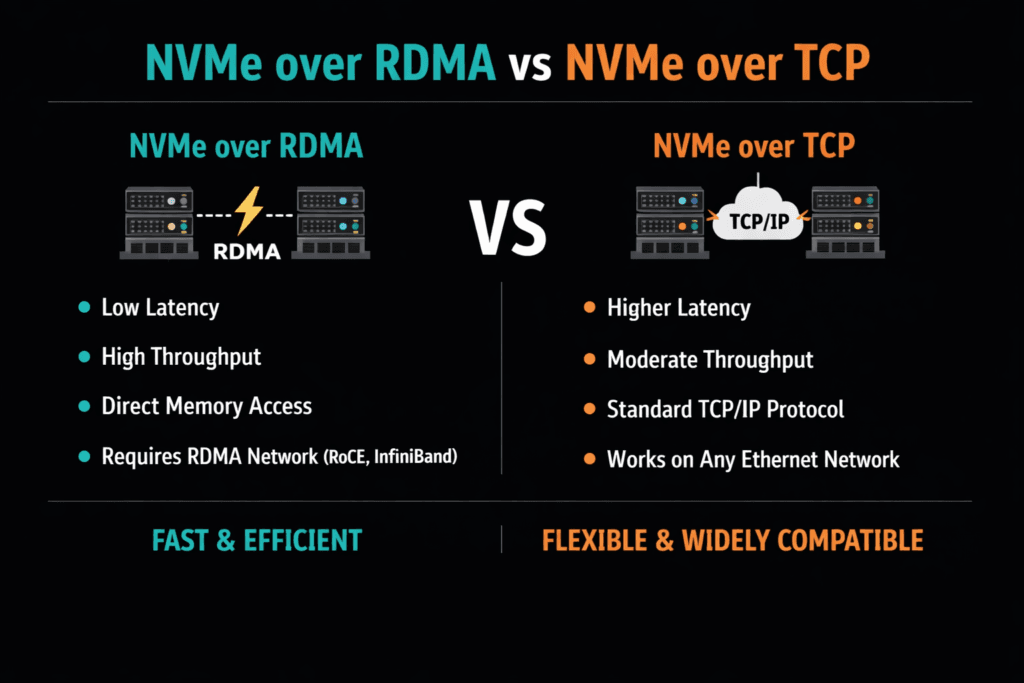
RDMA transports (often RoCEv2 or InfiniBand) move data with fewer CPU cycles because they avoid much of the traditional TCP/IP path. NVMe/TCP runs on standard Ethernet and uses the TCP stack, so it fits most data centers with less network change. Both can meet serious performance targets when the storage stack uses an efficient data path and enforces clean isolation.
This topic matters most for Kubernetes Storage and multi-tenant platforms. One noisy workload can raise queue depth, push p99 latency up, and burn CPU across many nodes. A strong Software-defined Block Storage layer reduces that risk with QoS and consistent policy.
Picking the Right Transport for CPU, Latency, and Operations
Transport choice sets the ceiling, but the data path decides how close you get. A user-space I/O path can reduce context switches and interrupt pressure. A zero-copy flow can reduce memory moves. Those gains help both transports because they cut work on the hot path.
Operations also decide the outcome. If you run strict SLOs, you need stable queue behavior and clear limits. Without QoS, a burst can flood shared queues and turn average latency into a misleading metric. Strong isolation keeps platform behavior steady when traffic changes fast.
🚀 Keep NVMe/TCP Simple While Protecting CPU and p99
Use Simplyblock to cut hot-path overhead and isolate noisy neighbors across tenants.
👉 Use Simplyblock for Multi-Tenant QoS →
NVMe over RDMA vs NVMe over TCP in Kubernetes Storage
Kubernetes adds real overhead that can hide the “transport story.” CSI components, pod CPU limits, and node placement can change CPU-per-I/O more than the transport does. NUMA layout matters, too. If the workload and the I/O path land on different sockets, CPU use rises, and tail latency often rises with it.
Architecture choice also matters. Hyper-converged setups can cut hops for hot services. Disaggregated setups can simplify scaling and improve pool use. Mixed layouts let teams keep latency-bound services close while using shared pools for general workloads. The best fit depends on whether your main limit is CPU, latency, or operations effort.
How NVMe/TCP and RDMA Differ Under Load
RDMA often wins on CPU efficiency at high IOPS and can hold tighter p99 latency when the fabric is tuned well. That advantage shows up fast in write-heavy services and high-concurrency patterns.
NVMe/TCP wins on reach and simplicity. It uses standard Ethernet, common switches, and familiar tooling. NVMe/TCP also scales cleanly across large networks, which helps when clusters grow or hardware mixes over time.
Many teams use a tiered model: NVMe/TCP for broad use, RDMA for strict latency tiers. That model works best when one storage platform manages both tiers so policy, security, and operations stay consistent.
Measuring NVMe over RDMA vs NVMe over TCP Performance
Benchmark with CPU and tail latency together, not just peak IOPS. Track initiator CPU, target CPU, throughput, and p95/p99 latency while you raise the load. Keep the job count, queue depth, and block size the same across runs. Change one variable at a time, or your numbers will drift.
In Kubernetes, test under real cluster settings. Use the same CNI, the same CPU limits, and the same placement rules you plan to run in production. Add mixed read/write tests, because contention patterns often drive real outages and slowdowns. Report results as “IOPS per core” at a latency target. That view matches how platform teams plan capacity.
Practical Steps to Improve Results
Use one controlled set of changes and validate each step with CPU-per-I/O and p99 latency.
- Align IRQ affinity and I/O threads with NUMA locality to reduce cross-socket traffic.
- Use a user-space, polled-mode data path to cut context switches and interrupt work.
- Reduce memory copies with a zero-copy pipeline where it fits your stack.
- Apply per-volume QoS to stop queue growth during bursts and to protect other tenants.
- Keep network settings consistent across nodes, and document the “known good” profile.
Transport Comparison Matrix for Production Platforms
The table below summarizes what most teams see when they run these transports at scale.
| Dimension | NVMe/TCP | NVMe/RDMA (RoCEv2 or InfiniBand) |
|---|---|---|
| Network requirements | Standard Ethernet | RDMA-capable NICs, plus fabric tuning |
| Host CPU use at high IOPS | Often, tighter p99 when tuned well | Lower, less host CPU work per I/O |
| Tail latency in burst load | Good average, p99 can rise near CPU limits | Often tighter p99 when tuned well |
| Rollout speed | Fast in most estates | Slower, needs network readiness |
| Best fit | Broad platform use, cloud-native scale | Latency-bound tiers, high IOPS targets |
Meeting Storage Targets with Simplyblock™
Simplyblock™ focuses on efficient NVMe-oF data paths and platform controls that keep performance steady under multi-tenant load. Its SPDK-based, user-space, zero-copy design targets higher IOPS per core and less hot-path waste. That helps both NVMe/TCP and RDMA tiers because it reduces overhead that stacks often add around the transport.
For Kubernetes Storage, simplyblock supports hyper-converged, disaggregated, and mixed deployments. That flexibility lets teams place low-latency tiers close to apps while keeping shared pools for general workloads. Multi-tenancy and QoS help protect p99 targets when many namespaces compete for the same storage plane. Those controls matter when you run NVMe/TCP at scale and want stable behavior during bursts.
Transport Choices as Clusters Grow
Expect more hardware offload and more policy-driven placement. DPUs and IPUs will take on more transport work, which can reduce host CPU load and smooth tail latency. Observability will also improve. Teams will track queue depth, CPU-per-I/O, and p99 latency as first-class SLO inputs, not afterthoughts.
NVMe/TCP will likely stay the default for broad coverage because it fits Ethernet operations. RDMA will keep its role in tiers that demand the tightest latency. A storage layer that supports both lets teams move workloads between tiers without changing the control plane.
Related Terms
Teams often review these pages when they compare CPU use and tail latency across NVMe-oF transports.
Questions and Answers
NVMe/RDMA can deliver lower p99 because it bypasses more host networking overhead, but it only stays “better” when the RDMA fabric is engineered correctly (loss behavior, congestion control, NIC/queue tuning). NVMe/TCP is usually easier to operate on standard Ethernet, and the gap often shrinks if RDMA is mis-tuned. Use the same workload shape and compare p95/p99 plus CPU-per-IOPS using NVMe over TCP vs NVMe over RDMA.
The tradeoff is “lowest CPU + lowest latency” versus “simpler ops + broader compatibility.” RDMA reduces host CPU overhead at high PPS, but it raises operational complexity (RDMA-capable switches/NICs, fabric tuning, validation). TCP is more forgiving and easier to scale with existing tooling. Frame the decision using a transport-focused view, like NVMe over Fabrics transport comparison.
NVMe/TCP commonly becomes CPU-limited on small-block random I/O at high queue depth because packets-per-second and completion processing rise faster than bandwidth use. RDMA can push that CPU wall outward by offloading more work to the NIC. If your IOPS plateaus while bandwidth is available, you’ve likely hit the CPU ceiling. Validate with NVMe over TCP CPU overhead.
Both suffer, but the failure mode differs: TCP degrades with queueing and retransmits, while RDMA performance can collapse if loss, congestion, or ECN/PFC design isn’t disciplined. The practical check is whether your fabric behavior under congestion is predictable enough to protect p99 at peak load. Run failover and contention tests, not only steady-state throughput.
Use identical initiator/target CPU limits, queue depth, block sizes, and multipath settings, then compare p95/p99, CPU-per-IOPS, and “time-to-stable-p99” after link loss. Also test under background traffic because transports diverge most during contention. If you only benchmark idle fabrics, you’ll pick the wrong winner.