NVMe over TCP CPU Overhead
Terms related to simplyblock
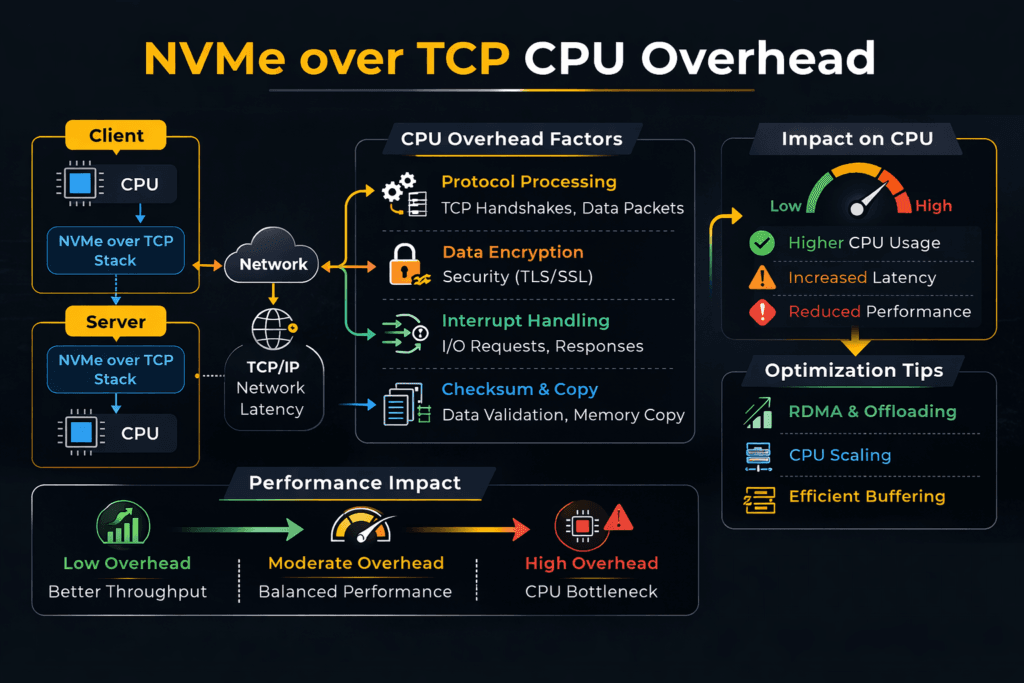
NVMe over TCP CPU overhead is the CPU work your hosts spend to run NVMe I/O over Ethernet with the TCP/IP stack. The initiator uses the CPU to build and process packets, manage queues, and move data between buffers. The target also spends CPU to handle packets, schedule work, and complete I/O.
Leaders often see the impact as a core tax. More CPU goes to storage traffic, so fewer cores stay available for apps. Ops teams usually spot it in rising p95 and p99 latency during bursts, plus uneven performance when several tenants share the same nodes.
You do not need “zero CPU” for storage. You need steady CPU-per-I/O, so performance scales in a clean way and stays stable under load. That goal matters most in Software-defined Block Storage for Kubernetes Storage, where many services compete for the same host and network paths.
Lowering CPU Cost with a Better Data Path
Most CPU waste comes from extra work in the hot path. The usual causes include too many context switches, too many interrupts, and too many memory copies. A faster path trims that waste and improves IOPS per core.
User-space polling can cut interrupt churn. Zero-copy design can cut buffer moves. Strong queue control can keep tail latency from jumping when traffic spikes.
Platform controls also shape the outcome. QoS limits can stop one bursty tenant from driving the queue depth up for everyone else. Clear limits make performance easier to plan and easier to run.
🚀 Cut NVMe over TCP CPU Overhead per I/O
Use Simplyblock to reduce core burn and keep NVMe/TCP latency steady under load.
👉 Use Simplyblock for NVMe over TCP Storage →
NVMe over TCP CPU Overhead in Kubernetes Storage
Kubernetes adds CPU costs that do not show up in bare metal tests. CSI behavior, pod CPU limits, NUMA layout, and node placement can all raise CPU-per-I/O. When a pod lands far from the storage target, the host pays extra CPU to move data across sockets and caches. That same placement can also push p99 latency up.
Teams can manage those costs with smart layout choices. Hyper-converged placement can cut hops for hot services. Disaggregated placement can raise pool use and simplify scaling. A mixed setup can keep the “hot path” close while still using shared pools for the rest.
NVMe over TCP CPU Overhead and NVMe/TCP at Scale
NVMe/TCP runs NVMe-oF commands over standard IP networks. That choice fits most data centers, so teams adopt it fast. CPU cost rises with packet rate, queue depth, and buffer work. Small I/O at high depth pushes packet work up, so CPU climbs sooner. Larger I/O shifts the cost toward moving payloads, which can help throughput-per-core.
RDMA transports often use fewer CPU cycles for the same latency target. Still, many teams pick NVMe/TCP for broad use because it matches common Ethernet ops. A good storage layer can also keep NVMe/TCP stable under multi-tenant load, which is the real business need.
NVMe over TCP CPU Overhead Testing and Benchmark Design
Track CPU and tail latency together. Measure the initiator CPU and the target CPU while you ramp the load. Watch p95 and p99 as you approach saturation, not only peak IOPS. A simple and useful metric is “IOPS per core” at a fixed latency target.
In Kubernetes, test under real cluster settings. Use the same CNI, the same limits, and the same placement rules. Run long enough to catch scheduler noise and background work. Then run mixed read and write profiles, because noisy neighbor effects often drive real-world pain.
Practical Tuning Moves that Improve CPU Efficiency
Pick one change at a time, and validate it with CPU-per-I/O and p99 latency.
- Use a user-space, polled-mode data path to cut context switches and interrupts.
- Use zero-copy where you can to cut buffer moves.
- Pin IRQs and I/O threads to the right NUMA node to keep data local.
- Set QoS per tenant or volume to limit queue growth under burst load.
- Tune network queues and affinity so packet work stays even at high depth.
- Use RDMA only for the tiers that need the lowest tail latency.
Side-by-Side Options for CPU Overhead and Latency Behavior
The table below shows how common choices tend to behave as load rises, with a focus on CPU cost and tail latency.
| Option | CPU cost pattern | Tail latency under load | Ops fit |
|---|---|---|---|
| iSCSI over TCP | High CPU per I/O at scale | Wider p99 spread | Common in legacy estates |
| NVMe/TCP with kernel-heavy path | Medium to high CPU at high packet rates | p99 rises near CPU limits | Easy rollout on Ethernet |
| NVMe/TCP with user-space zero-copy path | Lower CPU-per-I/O, better IOPS per core | Tighter p99 during bursts | Strong fit for steady SLOs |
| NVMe/RDMA (RoCE/IB) | Lowest CPU cost when tuned | Best p99 and jitter control | Needs RDMA fabric skills |
Meeting Storage SLOs with Simplyblock™
Simplyblock™ targets high IOPS per core by using an SPDK-based, user-space, zero-copy data path. That design can reduce interrupt churn and cut buffer moves in the hot path. As NVMe/TCP load grows, those gains help keep CPU use steadier and tail latency tighter.
For Kubernetes Storage, simplyblock supports hyper-converged, disaggregated, and mixed layouts. That flexibility lets teams balance latency goals and core budgets. Multi-tenancy and QoS also help keep one tenant from pushing queues up across the cluster, which helps operators hold p99 targets.
Where CPU Overhead Trends Next
Storage stacks will keep pushing CPU work out of the kernel hot path. Teams will adopt more zero-copy flows and more user-space fast paths. DPUs and IPUs will also take on more network and storage work, which can free host CPU for apps.
NVMe/TCP will keep growing because it fits Ethernet ops. RDMA will keep its place in the tiers that demand the lowest tail latency. A flexible platform that supports both can protect performance over time.
Related Terms
Teams often review these pages when they troubleshoot NVMe/TCP CPU load and tail latency in Kubernetes.
- Asynchronous Storage Replication
- NVMe over TCP vs NVMe over RDMA
- Kubernetes Storage Performance
- CSI Performance Overhead
Questions and Answers
NVMe/TCP can become CPU-bound when per-IO packet processing, queue handling, and completion processing scale faster than throughput. Small-block random I/O at high queue depth is the common trigger because packets-per-second rise sharply. The effect shows up as flattening IOPS with rising host CPU and worsening tail latency, which is why NVMe over TCP architecture matters more than peak GbE rates.
Higher queue depth improves device utilization but can increase CPU cost due to more in-flight commands, more completions, and more network work per second. Tiny I/O sizes raise PPS and interrupt/polling pressure, so CPU-per-IOPS worsens even if latency looks “okay” at low load. Benchmark with consistent profiles using fio NVMe over TCP benchmarking and interpret results via storage latency vs throughput.
SPDK can lower overhead by running the data path in user space with poll-mode processing, reducing context switches and kernel scheduling jitter. The tradeoff is dedicating cores to polling to stabilize p99, so “lower overhead” often means “more reserved CPU but better efficiency under load.” This is the core idea behind SPDK vs kernel storage stack and why teams deploy SPDK for NVMe over Fabrics.
NVMe/TCP overhead is frequently dominated by networking, not SSDs. Poor RSS/queue mapping, NUMA mismatch, or suboptimal offloads can force cross-core bouncing and inflate p99. The fix is aligning cores, NIC queues, and memory locality as part of the end-to-end storage IO path in Kubernetes or bare-metal host design, not only tweaking storage parameters.
Measure CPU-per-IOPS and p95/p99 latency while sweeping queue depth and block size, then repeat under “dirty” conditions like background traffic or packet loss. If IOPS plateaus while CPU rises, you’ve found the CPU wall, even if bandwidth is unused. Use disciplined storage performance benchmarking plus targeted fio NVMe over TCP benchmarking to avoid misleading hero numbers.