OpenShift Data Resiliency
Terms related to simplyblock
OpenShift Data Resiliency describes how an OpenShift platform keeps data correct and reachable when nodes fail, zones drop, or teams run upgrades. It covers how much data you can lose, how fast you can recover, and how steady performance stays during rebuild work. A strong resiliency plan does not rely on hero moves. It relies on clear targets, repeatable actions, and storage behavior you can predict.
Many outages start as a routine change. A node drain triggers a reschedule. A storage pool starts a rebuild. A noisy workload spikes I/O. When resiliency works, the app keeps serving, and the data stays safe.
OpenShift Data Resiliency Targets That Map to RPO and RTO
Start with two numbers: RPO and RTO. RPO sets the maximum data loss you can accept. RTO sets the maximum time the service can stay down. These numbers turn “resilient” into something you can test.
A strict RPO pushes you toward real-time protection, which can add write latency. A relaxed RPO gives you more room, but it accepts a small loss window during a larger fault. Choose the target per workload tier, not per team preference.
Scope matters too. Some teams protect a single cluster from node loss. Others plan for zone loss or even full site loss. Pick the failure domain that matches business risk, then design storage and runbooks around it.
🚀 Choose the Right Failure Domain Before You Set Resiliency Targets
Use zonal vs regional storage guidance to match OpenShift recovery goals to real outage risk.
👉 Read Zonal vs Regional Storage →
OpenShift Data Resiliency in Kubernetes Storage Day-2 Operations
OpenShift Data Resiliency shows up every time the cluster changes. Operators drain nodes, roll updates, and rotate hardware. Those actions stress Kubernetes Storage because stateful Pods must detach, attach, and mount fast, and they must return clean.
Resiliency also depends on how you protect the state. Snapshots help with fast rollbacks and point-in-time recovery. Replication helps with fast failover. Erasure coding can protect data with less raw overhead than full copies, but rebuild work can compete with live traffic if you do not control it.
Treat these features as platform contracts. Define which tiers get which protection. Standardize storage classes so teams do not invent custom settings. Validate the full flow during the same events you run in production, such as drains and upgrades.
OpenShift Data Resiliency With NVMe/TCP and Software-defined Block Storage
Transport and data path shape resiliency more than most teams expect. When the platform rebuilds or rebalances, it can increase background I/O. If your storage path burns extra CPU or adds jitter, the app sees higher tail latency right when it needs stability.
NVMe/TCP helps because it runs on standard Ethernet while still offering NVMe-oF behavior. That makes it easier to scale storage networks across clusters without special fabrics. It also helps teams keep a consistent operational model across environments.
Software-defined Block Storage adds control where it matters. It lets the platform set policies for isolation, performance, and protection without per-app storage hacks. Combine that with an SPDK-based user-space data path, and you can reduce the overhead that often shows up as latency spikes during rebuild work.
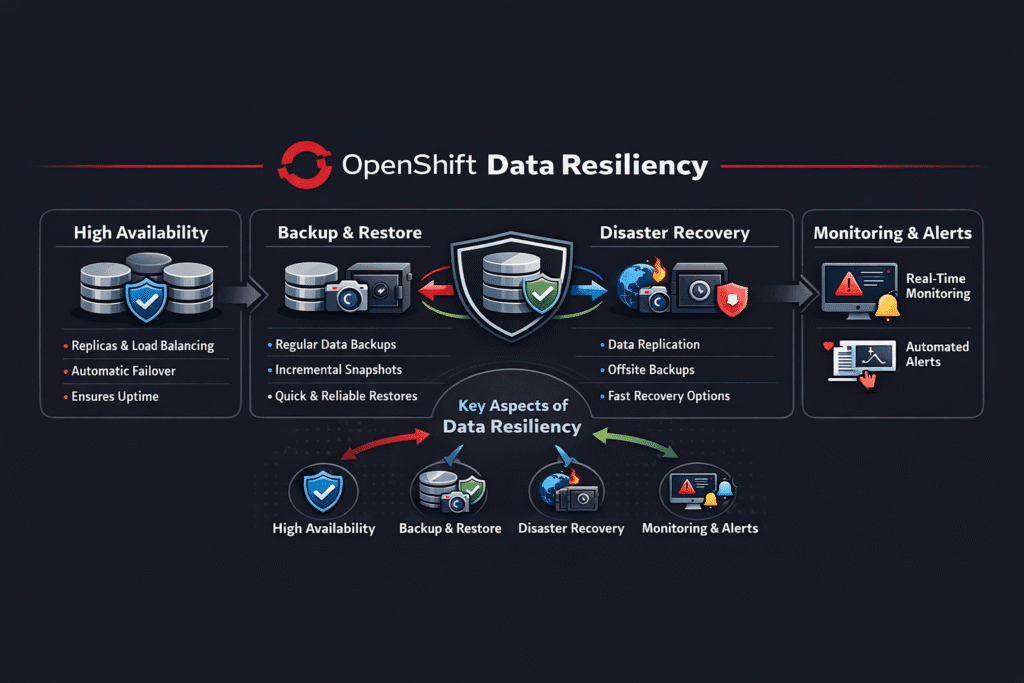
Approaches for Improving OpenShift Data Resiliency Performance
OpenShift Data Resiliency improves when the platform reduces surprise work during failures and keeps priority apps ahead of background tasks. Start by separating resiliency tiers, so each workload gets the right protection level without manual tuning. Next, set clear QoS boundaries in the storage layer, so rebuilds, snapshots, and replication do not steal latency from tier-1 services. Then validate recovery paths with drills that include node drains, zone loss simulations, and restore tests, because real faults rarely match lab conditions.
Operational discipline matters as much as the storage engine. Keep runbooks short, automate the checks that confirm data safety, and trigger alerts when recovery time slips past targets. Align Pod placement with failure domains, so replicas do not share the same blast radius. Finally, review capacity headroom often, because resiliency features need spare resources to rebuild quickly under pressure.
Controls That Improve OpenShift Data Resiliency Without Guesswork
- Define RPO and RTO per tier, then map each tier to a protection method you can test.
- Run game-day drills that include storage events, not only app restarts.
- Enforce QoS so rebuild or backup work, cannot starve tier-1 services.
- Align failure domains with placement rules so replicas do not share the same blast radius.
- Automate checks for restore readiness, attach time, and mount time after every upgrade.
Resiliency Methods Compared for OpenShift Platforms
This comparison highlights how common approaches trade speed, risk, and operational load.
| Method | RPO profile | RTO profile | Performance risk during rebuild | Best fit |
|---|---|---|---|---|
| Synchronous replication | Very low | Fast in-zone | Higher write latency under load | Tier-1 databases with tight loss limits |
| Asynchronous replication | Low to moderate | Often fast | Small loss window in big faults | Cross-zone protection with latency limits |
| Erasure coding | Low for node loss | Varies by load | Rebuild contention without QoS | Cost-aware protection at scale |
| Snapshots + restore | Depends on the restore speed | Depends on restore speed | Restore spikes if unplanned | Rollback, testing, point-in-time recovery |
| Backup tooling and runbooks | Policy-driven | Policy-driven | Slow restores if untested | Compliance and full recovery plans |
OpenShift Data Resiliency with Simplyblock™
Simplyblock™ supports Kubernetes Storage with Software-defined Block Storage designed for steady day-2 behavior. Simplyblock supports NVMe/TCP for fast block access over Ethernet. It also uses an SPDK-based user-space data path to reduce overhead, which helps keep latency steadier during drains, rollouts, and rebuild work.
Multi-tenancy and QoS controls help protect critical workloads when several teams share the same storage pool. That matters for resiliency because background work should not steal performance from the apps you must keep online.
What OpenShift Teams Improve Next
Teams keep moving from “we have backups” to “we can prove recovery.” They add automated checks after upgrades. They test restores on a schedule. They tighten policy, so each tier gets the right protection by default.
As clusters grow, operators also focus more on cross-zone behavior and on noisy-neighbor control. The platforms that win will combine clear policy, fast recovery, and predictable performance under change.
Related Terms
Teams review these pages with OpenShift Data Resiliency to align protection choices with Kubernetes Storage operations.
- Zonal vs Regional Storage
- Data Replication
- Erasure Coding
- Distributed Storage System
- OpenShift Volume Snapshots
Questions and Answers
Data resiliency in OpenShift refers to the platform’s ability to maintain data availability and integrity during node failures, network outages, or volume errors. Using resilient stateful storage for Kubernetes, like Simplyblock, ensures critical workloads stay operational under failure scenarios.
OpenShift relies on CSI-backed storage systems to provide replication across zones or nodes. Simplyblock supports multi-zone block storage replication, helping maintain data durability and access even when infrastructure components fail.
Yes. Combining isolated StorageClasses, CSI features, and RBAC policies helps maintain both data security and resilience. Simplyblock’s multi-tenant storage architecture supports data isolation while ensuring high availability for each tenant’s volumes.
Snapshots allow you to capture and restore volume states quickly, which is crucial during upgrades or incidents. Simplyblock provides CSI-integrated snapshot support to help automate resilient workflows in OpenShift without data loss or downtime.
To support disaster recovery, OpenShift storage must enable encrypted, replicated, and snapshot-capable volumes. Simplyblock’s CSI driver supports encryption at rest with DARE, along with fast cloning and multi-zone replication, forming the backbone of a resilient OpenShift setup.