QoS Policy in CSI
Terms related to simplyblock
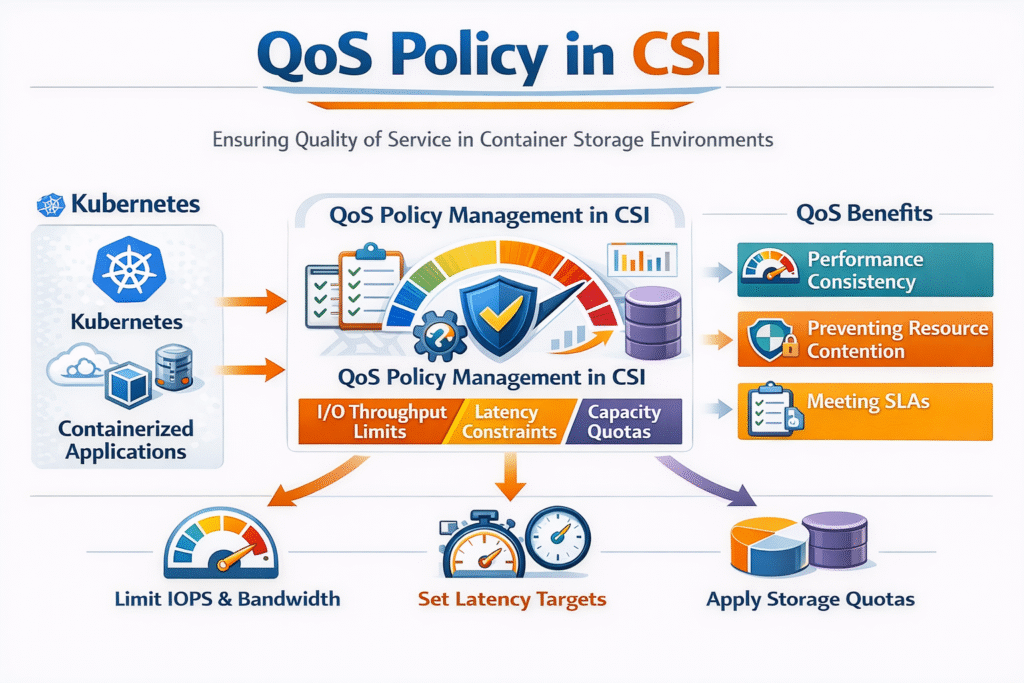
A QoS Policy in CSI sets clear performance rules for persistent volumes in Kubernetes Storage. Platform teams use it to prevent noisy neighbors, keep p95 and p99 latency steady, and offer storage tiers that match business needs.
CSI itself does not “magically” enforce IOPS. The CSI driver and the storage backend enforce limits. Kubernetes provides the control plane objects that express intent, such as StorageClass, PersistentVolumeClaim, and newer volume attribute profiles. When those objects align with backend controls, teams get repeatable performance instead of best-effort sharing.
This topic matters most when you run Software-defined Block Storage across many teams, clusters, or tenants, and you need predictable behavior during spikes, reschedules, and rebuilds.
Why a QoS Policy in CSI Matters for Noisy-Neighbor Control
Noisy neighbors show up when one workload consumes queue depth, bandwidth, or backend CPU, and other workloads pay the latency bill. A CSI-driven QoS policy gives you a contract: “this class gets up to X IOPS and Y MB/s,” or “this pool caps total throughput.”
Strong policies also reduce spending. Without limits, teams often overbuy disks and NICs to survive peak hours. With limits and tiers, you can run higher utilization while still protecting tier-1 databases and revenue apps.
When you use NVMe media, the backend can deliver very high peak throughput. That also means one tenant can flood the system faster. QoS brings fairness back, and it helps you keep performance stable as you scale.
🚀 Enforce Storage QoS Policies in CSI for Predictable Kubernetes Performance on NVMe/TCP
Use simplyblock to apply tenant-aware limits, protect p99 latency, and keep noisy neighbors in check.
👉 Use simplyblock Multi-Tenancy and QoS →
CSI QoS vs Pod QoS – Scope and Limits
Kubernetes already has Pod QoS classes, but they target CPU and memory eviction behavior. Storage QoS targets I/O, latency, and throughput across the storage path. Treat them as separate tools.
A practical model is simple: Pod QoS protects node compute during pressure, while storage QoS protects volume performance during contention. If you run stateful apps, you need both, plus clear observability so teams can see when a limit helps and when it hurts.
How a QoS Policy in CSI Maps to StorageClass and VolumeAttributesClass
Most teams start with StorageClass it because it defines “what you get” at provisioning time. You can map each StorageClass to a tier, a pool, encryption rules, placement rules, and performance limits, based on what your CSI driver supports.
Newer clusters may also use VolumeAttributesClass When they want to change performance attributes after a volume exists. That feature lets you treat performance like a profile that you can adjust without recreating the PVC.
Your CSI driver decides what parameters it accepts. Some drivers expose direct caps, such as max IOPS and max bandwidth, while others expect you to apply limits at the pool level. The cleanest setup uses a small number of tiers, clear names, and guardrails that stop “one-off” classes from spreading across the fleet.
QoS Policy in CSI and NVMe/TCP – Keeping Latency Predictable
NVMe/TCP gives many teams a practical NVMe-oF path over standard Ethernet. It helps you scale shared storage without building an RDMA-only network on day one. Under load, CPU cost and data-path overhead often decide whether latency stays steady.
User-space, SPDK-style designs can reduce copies and context switches. That keeps more CPU available for the app and can reduce jitter when concurrency rises. In practice, this improves the “bad day” numbers, not only the best-case benchmark.
In Kubernetes Storage, NVMe/TCP also supports disaggregated layouts where compute and storage scale independently. That flexibility helps you place performance tiers where they fit best, including baremetal clusters.
QoS Policy in CSI Operations – Metrics and Test Methods
Treat storage QoS as a measurable control loop. Start with latency percentiles, then add IOPS, throughput, queue depth, and per-volume throttling events. When you see p99 spikes, confirm whether a single tenant drives the spike or the backend hits a hard limit.
Use realistic load tests. fio can model your block size, read/write mix, and concurrency. Run tests during “day-2 events,” such as rollouts, node drains, rebuilds, and snapshot windows, because those moments often trigger contention.
If you enforce a cap, validate behavior at three layers: inside the pod, at the node, and at the storage target. That view helps you spot cases where the app retries and makes the problem worse.
Practical Ways to Make Storage QoS Work in Production
The fastest wins come from simple tiers and strict defaults, not from endless tuning.
- Start with two or three performance tiers that match real app groups, such as database, general, and low-cost.
- Set per-tenant or per-volume caps that stop burst traffic from starving other workloads.
- Add topology rules so volumes stay close to workloads, especially across zones.
- Review limits after major app changes, such as compaction tuning, backup jobs, or new ingest peaks.
Comparing Common CSI QoS Designs for Shared Platforms
The table below compares several ways teams implement storage QoS in Kubernetes Storage. Use it to balance predictability, ops effort, and how well the control survives real incidents.
| Approach | Where limits live | Strength | Common risk | Best fit |
|---|---|---|---|---|
| Best-effort StorageClass tiers | Naming only | Easy rollout | No real isolation | Small dev clusters |
| StorageClass parameters (driver-specific) | Per volume | Clear per-PVC caps | Vendor lock-in to parameters | Multi-tenant platforms |
| Pool-level QoS in Software-defined Block Storage | Shared pool | Simple, strong guardrails | Pool cap can throttle all tenants | “Gold pool” style tiers |
| VolumeAttributesClass profiles | Mutable perf profile | Change performance without re-provision | Needs cluster support and driver support | Ops teams with strict SLOs |
Predictable Storage Isolation with Simplyblock™
Simplyblock™ focuses on policy-driven controls for Software-defined Block Storage in Kubernetes Storage, including multi-tenancy and QoS to reduce noisy-neighbor impact. Simplyblock supports NVMe/TCP and NVMe/RoCEv2, so you can choose Ethernet-first simplicity or RDMA where it fits.
Simplyblock also uses an SPDK-based, user-space data path to reduce overhead in performance-critical flows. That design helps keep latency tighter under load and supports higher efficiency per node.
For teams that run internal storage-as-a-service, this combination matters: clear tiers, enforceable limits, and a fast NVMe path that behaves like a SAN alternative without SAN-style friction.
What Comes Next for CSI Storage Performance Policies
Kubernetes keeps moving toward clearer, safer ways to express storage intent. Volume attribute profiles and richer topology controls push storage policy closer to a day-2 reality, where apps change, and clusters reschedule constantly.
Hardware offload also changes the game. DPUs and IPUs can handle more of the storage and network work, which reduces host CPU noise and helps keep performance steady at higher density.
Related Terms
Platform teams often review these glossary pages alongside QoS Policy in CSI when they standardize storage tiers, topology rules, and repeatable PVC behavior in Kubernetes Storage.
CSI Topology Awareness
Block Storage CSI
Dynamic Provisioning in Kubernetes
Storage Quality of Service (QoS)
Questions and Answers
QoS (Quality of Service) policies in CSI allow you to define IOPS, throughput, or latency thresholds for persistent volumes. This helps ensure consistent performance for critical apps like databases running in Kubernetes, especially during peak loads or noisy neighbor scenarios.
Yes. By assigning performance guarantees or limits via QoS policies, you can isolate workloads and avoid IO contention. This is particularly useful in multi-tenant Kubernetes environments where unpredictable spikes can degrade shared storage performance.
Not all CSI drivers implement QoS natively. Solutions like Simplyblock that support advanced features like volume-level provisioning can expose fine-grained controls for performance allocation—making them more suitable for production environments.
QoS policies are typically set via StorageClass parameters or annotations in PVC definitions. For example, you can define IOPS limits or bandwidth guarantees. Refer to your CSI driver’s documentation or the Simplyblock deployment guide to set up QoS correctly.
Latency-sensitive apps like time-series databases or financial platforms require predictable IO. CSI QoS ensures these workloads get the performance they need even under shared infrastructure, aligning with SLAs and RPO/RTO targets critical to business continuity.