Scale-Up vs Scale-Out Storage
Terms related to simplyblock
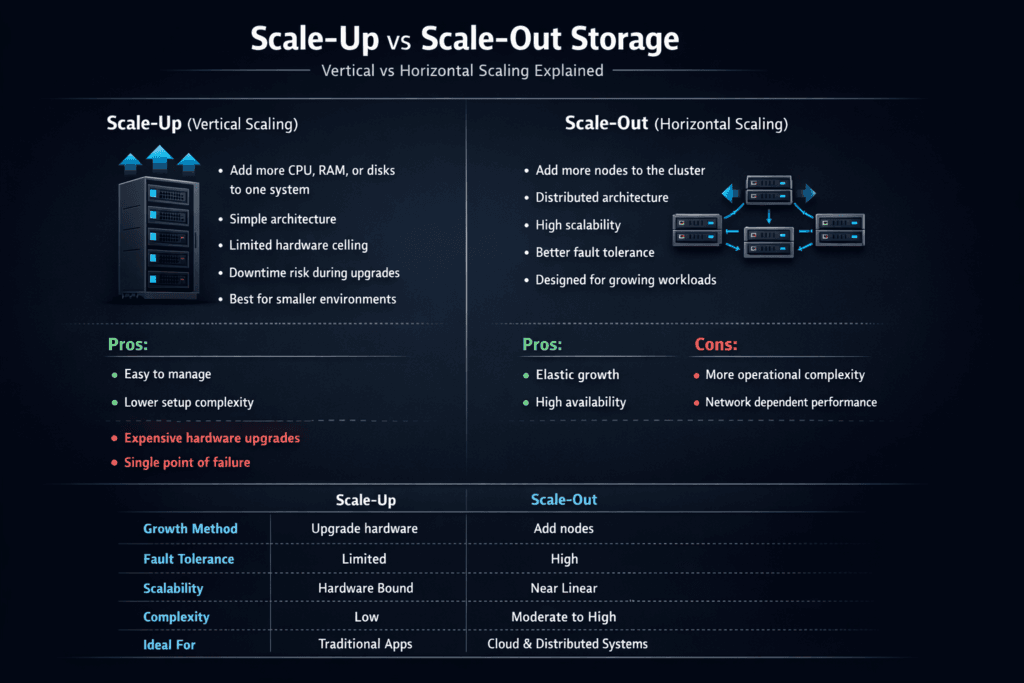
Scale-Up vs. Scale-Out Storage compares two approaches to scaling capacity and performance in block storage systems. Scale-up adds bigger CPUs, more RAM, faster NICs, and more drives to a single array or controller pair. Scale-out adds more nodes to a shared storage cluster, so throughput and IOPS rise with each node. For many enterprises, this choice decides how well the platform handles growth, failures, and multi-tenant noise.
In Kubernetes Storage, the trade-off becomes more visible because stateful apps create bursts, reschedules trigger reattach work, and teams expect automation through CSI. When storage can’t keep pace, tail latency rises, and application teams blame Kubernetes, the network, or the database, even though the root cause sits in the storage design.
What Changes When You Grow a Storage System
Scale-up feels simple at first. You keep one management plane and one failure domain, and you buy a bigger box when you hit limits. That model breaks down when workloads outgrow the controller, when rebuild times stretch, or when upgrades require careful planning to avoid downtime.
Scale-out shifts the problem. You manage more nodes, but you also remove the “one box ceiling.” A well-built scale-out cluster distributes data and load across nodes, helping keep latency stable as demand rises. Software-defined Block Storage often supports this approach because it can run on standard hardware, apply policy, and evolve without forklift swaps.
🚀 Grow Storage Without Downtime as Workloads Expand
Use Simplyblock to scale out with policy controls and lower overhead in the I/O path.
👉 See Simplyblock Scale-Out Architecture →
Scale-Up vs Scale-Out Storage for Kubernetes Storage
Kubernetes Storage puts pressure on volume lifecycle speed and performance isolation. A scale-up array can deliver strong results for smaller, steady workloads, but it can struggle when multiple namespaces spike I/O at the same time. One busy workload can consume queue depth and cache, which pushes p99 latency up for everyone.
Scale-out fits Kubernetes patterns when the storage layer supports fast provisioning, safe expansion, and clear tenancy controls. A cluster can also match how teams scale apps: add nodes, add capacity, and keep moving. If the platform includes QoS, it can protect latency-sensitive services while batch jobs run in parallel.
Scale-Up vs Scale-Out Storage with NVMe/TCP
NVMe/TCP matters because it brings NVMe-oF performance characteristics to standard Ethernet environments. It can reduce protocol overhead compared to older approaches, and it can keep operations simpler than RDMA-heavy designs in many shops. When a scale-out system pairs NVMe/TCP with a lean data path, it often improves IOPS-per-core and tightens latency spread.
SPDK-style user-space I/O helps here. It reduces extra kernel work, cuts context switches, and avoids unnecessary copies in the fast path. That CPU efficiency can be the difference between stable performance and a noisy, saturated host under load. In mixed Kubernetes Storage clusters, the lower overhead also helps leave more CPU for applications.
Scale-Up vs Scale-Out Storage Benchmarking That Shows Real Limits
Benchmarking should reveal ceilings before production hits them. Average numbers hide pain. Tail latency shows it.
Start with a storage-only view. Measure p50, p95, and p99 read and write latency under random 4K patterns and mixed ratios. Track throughput under larger block sizes. Capture CPU usage so you can see when the data path burns cores before it hits media limits.
Then, validate end-to-end inside Kubernetes Storage. Run fio against PersistentVolumes, and include reschedules, snapshot workflows, and volume expansion in the test plan. Add a multi-tenant run where one workload floods I/O while another tries to hold steady latency. That scenario mirrors real clusters.
Practical Design Moves to Pick the Right Model
Use this short checklist to align the storage model with the platform goals:
- Set hard targets for p95 and p99 latency, not just IOPS and bandwidth.
- Map failure domains and rebuild time to your RPO and RTO needs.
- Decide how you will isolate tenants, and enforce it with QoS controls.
- Keep the I/O path lean, and watch CPU-per-IOPS under peak load.
- Match the topology to the org: centralized control for small teams, and scale-out clusters for shared platforms.
Storage Model Comparison for Enterprise Block Workloads
A quick comparison helps clarify where each model wins, and where it creates hidden risk as workloads and teams grow.
| Dimension | Scale-up storage | Scale-out storage |
|---|---|---|
| Growth pattern | Bigger controllers, more shelves | Add nodes to a cluster |
| Performance ceiling | Bounded by controller limits | Rises with node count |
| Upgrade path | Helps, but the controller can still cap | Rolling upgrades are common |
| Failure impact | Fewer components, bigger blast radius | More components, smaller per-node blast radius |
| Multi-tenant fairness | Can be harder under shared queues | QoS and placement can help isolate tenants |
| Kubernetes Storage fit | Works for steady, smaller footprints | Fits elastic, shared clusters |
| NVMe/TCP benefit | Helps, but controller can still cap | Pairs well with scale-out data planes |
Simplyblock™ for Scale-Out Results Without SAN Lock-In
Simplyblock™ is built for Software-defined Block Storage with NVMe/TCP at the core, and it targets Kubernetes Storage first. That focus supports scale-out growth without forcing vendor-locked hardware arrays. The platform also supports deployment choices that matter in practice, including hyper-converged, disaggregated, and mixed layouts.
For teams that need consistent service levels, simplyblock adds multi-tenancy and QoS controls so one workload does not take the whole cluster. SPDK-based design choices also help reduce CPU overhead in the storage fast path, which supports higher throughput per node and steadier tail latency under bursty workloads.
Where Storage Scaling Is Going Next
Enterprises want fewer hard ceilings and fewer risky migrations. That pushes platforms toward scale-out designs with clear automation for rebalancing, upgrades, and failure recovery. Kubernetes Storage will also keep raising the bar on volume lifecycle speed, snapshot flows, and safe expansion.
Expect more attention on CPU efficiency as NVMe devices and networks get faster. Expect more offload options with DPUs and IPUs as teams look for stable latency under heavy multi-tenant load. Expect NVMe/TCP to stay a common baseline because it fits standard Ethernet operations while still supporting NVMe-oF designs.
Related Terms
These terms help teams connect scaling choices to Kubernetes Storage, NVMe/TCP, and Software-defined Block Storage planning.
- Scale-Out Block Storage
- p99 storage latency
- Storage Scaling Without Downtime
- SPDK vs Kernel Storage Stack
Questions and Answers
Scale-up storage increases capacity or performance by upgrading a single system (more CPU, RAM, or disks). Scale-out storage adds nodes horizontally, distributing data and I/O across a cluster. A modern scale-out storage architecture eliminates single-controller bottlenecks and improves resilience.
Scale-out storage is generally better for Kubernetes because it aligns with distributed workloads and dynamic scaling. Simplyblock’s Kubernetes-native storage platform allows volumes to scale across nodes without downtime, unlike traditional scale-up arrays.
Scale-up systems can deliver strong performance initially but may hit hardware limits. Scale-out systems increase both capacity and throughput as nodes are added. Architectures built on distributed block storage provide linear performance scaling for demanding workloads.
Yes. Scale-out designs replicate data across multiple nodes, removing single points of failure. This improves availability and fault tolerance compared to scale-up systems that depend on a single controller, especially in enterprise environments.
Simplyblock uses NVMe-backed nodes connected via NVMe over TCP to create a distributed, software-defined storage layer. This allows independent scaling of performance and capacity while maintaining low latency and high availability.