SPDK Blobstore
Terms related to simplyblock
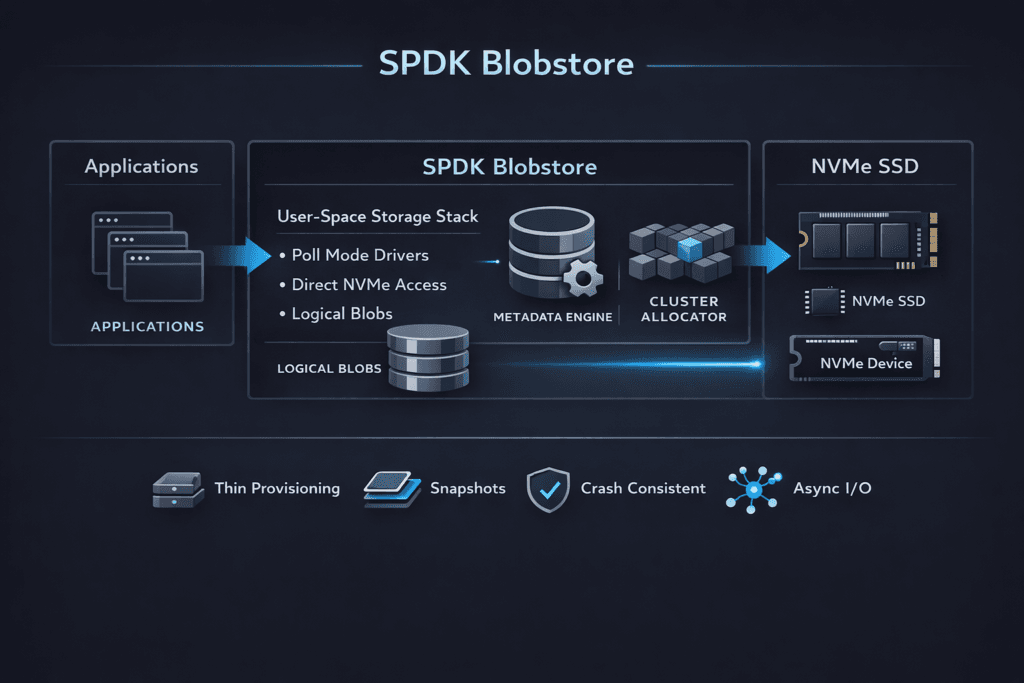
SPDK Blobstore is a low-level allocator in SPDK that places application-owned “blobs” on a block device. It helps storage builders map logical regions to physical space with low overhead and predictable rules. Many teams use it as a building block for user-space block services on NVMe because it keeps the I/O path lean.
Blobstore matters when you care about CPU per I/O and tail latency. Kernel-heavy stacks often burn CPU on interrupts, context switches, and extra copying. User-space storage aims to cut that waste. SPDK Blobstore supports that approach by keeping allocation and metadata handling close to the data path, instead of pushing those jobs into a general filesystem layer.
Leaders usually evaluate Blobstore when they want better performance density on baremetal, a stronger NVMe-oF story, or a cleaner path to NVMe/TCP at scale. Operators usually evaluate it when they tune queue depth, core pinning, and p99 behavior under bursts.
How User-Space Storage Cuts CPU Overhead at Scale
User-space storage stacks improve efficiency by shrinking the hot path. They avoid frequent context switches and reduce time in kernel I/O code. That helps most when workloads run many small I/Os, because each I/O carries fixed overhead in a traditional stack.
This design also changes how teams plan capacity. Instead of treating CPU as “free,” teams track CPU per IOPS as a first-class metric. When the CPU becomes the ceiling, adding NVMe devices will not raise throughput. A user-space path can push that ceiling higher, which helps dense nodes support more tenants.
SPDK emphasizes this model, and Blobstore fits as a media layout layer inside that model.
🚀 Standardize NVMe-oF on Ethernet
Use Simplyblock™ to operationalize NVMe/TCP with a Kubernetes-first control plane.
👉 NVMe over Fabrics and SPDK →
SPDK Blobstore in Kubernetes Volume Pipelines
Kubernetes Storage adds churn and multi-tenancy. Pods restart, nodes drain, and many workloads share the same pool. Those conditions punish deep queues and inconsistent scheduling. A blobstore-based engine can help when the platform keeps control work away from the I/O path.
Blobstore alone does not handle CSI, provisioning, placement policy, or QoS. A storage platform must wrap it with a control plane that creates volumes, maps them to media, and enforces limits so one tenant cannot dominate the queue. In practice, teams judge success by p99 stability during normal changes, not only by peak benchmarks.
If you want Kubernetes Storage that scales cleanly, pair Blobstore with a Software-defined Block Storage platform that treats isolation, placement, and day-2 ops as core requirements.
SPDK Blobstore and NVMe/TCP Data Paths
NVMe/TCP brings NVMe-oF semantics to standard Ethernet and routable IP networks. Many teams like it because it scales without specialty fabrics. Blobstore supports NVMe/TCP designs by providing a simple, low-overhead way to serve local NVMe media to a user-space target.
NVMe/TCP can still hit CPU limits at high packet rates. Small-block I/O pushes packets per second up fast, and that can raise p99 when the host runs out of cycles. A user-space stack can help by reducing per-I/O overhead and avoiding extra copies. Blobstore plays a supporting role here: it keeps media allocation predictable so the target spends more time doing I/O and less time chasing layout work.
For executives, the key question is simple: Does NVMe/TCP scale linearly as you add clients and nodes? Blobstore-based designs usually perform best when teams tune CPU pinning, NUMA locality, and queue depth early.
Benchmarking User-Space Block Storage for Tail Latency
Benchmarks should match your production I/O shape. Use the same block sizes, the same read/write mix, and the same sync behavior. Increase concurrency in steps, and track p50, p95, and p99 alongside throughput and CPU per IOPS. Tail latency will show you when queues start to form.
Test two modes on purpose. First, test “calm mode” with no competing background work. Then test “busy mode” with rebuild-like pressure, compaction-like pressure, or mixed tenants. Many stacks look fine in calm mode and drift in busy mode. The busy mode result matters more for Kubernetes Storage.
Keep the test repeatable. Run the same job files after each change to NIC settings, CPU pinning, or storage policy. That practice helps you separate real gains from noise.
Tuning Levers That Improve SPDK Blobstore Throughput
Use these actions to raise throughput without trading away p99.
- Pin I/O threads to dedicated cores, and align workloads to NUMA nodes.
- Validate queue depth under bursty load, not only at steady state.
- Size network links for packets per second, not only for bandwidth.
- Keep background jobs away from the hot path, and cap their rate.
- Measure CPU per IOPS, then tune until it stops improving.
Architecture Trade-offs Across SPDK, Kernel, and NVMe/TCP Stacks
The table below compares common ways teams build block services on NVMe and where each approach usually hits limits first.
| Approach | First limit in many setups | Common symptom | Typical fit |
|---|---|---|---|
| Kernel block stack + filesystem | Context switches and locking | p99 grows as IOPS rises | General-purpose hosts |
| SPDK bdev without Blobstore | Layout handled elsewhere | Fast path, more DIY work | Custom storage apps |
| SPDK Blobstore-based engine | Packet rate or media before CPU | Better IOPS per core | Dense NVMe nodes |
| NVMe/TCP user-space target + Blobstore | TCP CPU or network contention | Stable p99 when tuned | Ethernet-based NVMe-oF |
Kubernetes Storage With Simplyblock™ for Consistent Performance
Simplyblock™ uses an SPDK-based user-space data path to keep CPU overhead low while serving NVMe media at scale. It pairs that data path with controls that Kubernetes Storage teams need, including multi-tenancy and QoS. That combination helps keep tail latency steadier as concurrency rises.
Simplyblock™ also supports NVMe/TCP and NVMe/RoCEv2, so teams can match the transport to the network they already run. NVMe/TCP fits environments that favor standard Ethernet and simpler rollout. When teams need tighter latency and run RDMA-ready fabrics, NVMe/RoCEv2 can shift more work off the CPU.
For a fair comparison, test p99, CPU per IOPS, and degraded-mode behavior. That view will show whether your stack scales cleanly or hits a CPU wall.
Roadmap Themes for SPDK-Based Block Services
Teams now focus on performance density, not only peak benchmarks. Expect more use of DPUs/IPUs to offload protocol work and free host CPU. Expect better queue visibility, because operators need to see where p99 starts to drift. NVMe-oF deployments will also keep growing, and NVMe/TCP will remain a common choice in mixed data centers that value routable networks.
Blobstore will remain relevant because it provides a stable allocation layer that storage engines can build on. As more platforms productize SPDK, they will likely add stronger safety controls, clearer multi-tenant isolation, and simpler lifecycle operations around Blobstore-backed media.
Related Terms
Teams review these glossary pages alongside SPDK Blobstore when they design user-space block storage.
SPDK
SPDK Architecture
SPDK Target
NVMe over TCP (NVMe/TCP)
Questions and Answers
SPDK Blobstore manages blocks directly on NVMe without a POSIX filesystem layer, so it avoids extra metadata writes and page-cache effects that can inflate write amplification. This makes latency more stable under sustained small writes, especially when the data path is built for minimal kernel interaction. The key architectural comparison is SPDK Architecture, and why many designs prefer the SPDK vs Kernel Storage Stack approach for predictable p99.
Blobstore is the on-media allocation layer used to create “blobs” as durable objects on NVMe, which higher layers expose as logical volumes or backends for NVMe-oF targets. It’s a building block for a thin storage data plane where allocation, metadata, and I/O submission stay in user space. This fits cleanly into a storage data plane model paired with an external storage control plane.
Blobstore tuning is mostly about avoiding internal contention: pick sane I/O unit sizes, keep metadata operations bounded, and ensure enough CPU to avoid poller starvation. If CPU is tight, tail latency spikes even when NVMe bandwidth is available. Use repeatable storage performance benchmarking and interpret results through storage latency vs throughput rather than peak IOPS alone.
Blobstore can make local NVMe extremely efficient, but end-to-end performance can still be capped by Ethernet fan-out, retries, or east–west contention once you distribute I/O. That’s why NVMe/TCP deployments need both a clean local data path and a network plan. Validate against storage network bottlenecks in distributed storage and your NVMe over TCP architecture choices.
Blobstore provides durable on-device allocation, but it doesn’t automatically solve cluster-level redundancy or rebuild workflows. Recovery behavior depends on how your system replicates, erasure-codes, and rebalances data above Blobstore, and how aggressively it moves data during churn. Treat this as a durability-plus-operations problem using fault tolerance concepts and plan for storage rebalancing impact during failures and expansions.