Storage Latency Impact on Databases
Terms related to simplyblock
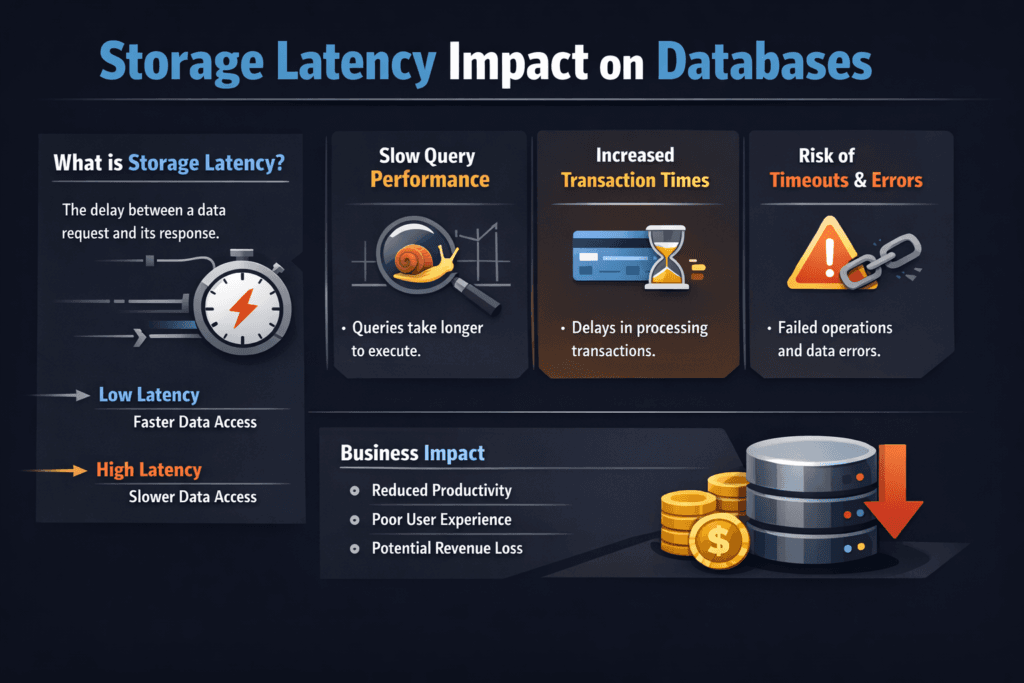
Storage Latency Impact on Databases describes how extra milliseconds in the storage path turn into slower queries, longer commits, and lower throughput. Databases wait on reads, writes, fsync calls, and log flushes. When latency rises, each transaction holds locks longer, the connection pool backs up, and the app starts timing out. Teams often add CPU and replicas to mask the problem, but the slow storage path still drives p99 behavior.
In Kubernetes Storage, latency can vary more than teams expect. Pod moves, shared nodes, and mixed tenants change queue depth and IO pressure throughout the day. For Software-defined Block Storage, stable latency matters more than peak IOPS because databases punish jitter first. NVMe/TCP helps when you need fast networked block storage on standard Ethernet.
Why Databases Feel Latency Before IOPS
Databases do not just move data; they coordinate it. A single user request can trigger index reads, WAL or redo log writes, and metadata updates. Each step can block the next step. When storage takes longer, the database does less work per second, even if the CPU sits idle.
OLTP systems show this effect quickly because they run many small IOs with strict ordering. Analytics systems can hide some latency with large scans, but they still suffer during checkpoint spikes, temp spill, and metadata-heavy operations. If you want predictable service levels, treat latency as a primary KPI, not a side metric.
🚀 Keep Database Commit Times Stable Under Load in Kubernetes
Use simplyblock to run NVMe/TCP Software-defined Block Storage with tenant-aware QoS for steady p99 latency.
👉 Use simplyblock for Database Performance Optimization →
Storage Latency Impact on Databases in Kubernetes Storage
Kubernetes Storage adds moving parts that change latency behavior. CSI operations can add setup time during mounts. Node-level noise can add queueing delay. Network hops can add jitter when volumes live on remote targets. The database does not care why the latency changed; it only reacts by slowing down.
Multi-tenancy makes the issue sharper. One tenant can push a burst of writes and fill shared queues. Another tenant sees slower commits even with the same query plan. Strong isolation and QoS help keep critical databases stable when shared clusters run hot.
Storage Latency Impact on Databases and NVMe/TCP
NVMe/TCP brings NVMe-oF semantics to standard Ethernet, which fits most data centers and cloud VPCs. It often improves latency consistency compared with older SCSI-based stacks because NVMe uses a leaner command model and supports deep parallelism.
Still, NVMe/TCP performance depends on the full path. Clean networking, stable CPU placement for protocol work, and an efficient storage target all matter. A user-space data plane based on SPDK can reduce CPU overhead and cut avoidable hops, which helps protect p99 latency when concurrency climbs. That combo matters in Kubernetes Storage because workloads shift, and the platform has to absorb change without surprising the database layer.
Measuring Storage Latency Impact on Databases With p99 and p999
Average latency hides the pain. Databases break when tail latency spikes. Track p95, p99, and p999 for reads and writes, and correlate those percentiles with database symptoms like lock wait time, replication lag, and checkpoint duration.
Use a two-layer method. First, run workload-shaped IO tests (block size, read/write mix, queue depth). Next, measure the database itself under a replay or load test. If p99 storage latency rises and commit time rises with it, you found a direct limiter. If commit time rises without a matching latency change, look at CPU, locks, and query plans.
Practical Ways to Cut Latency for Production Databases
Treat this as platform work, not a one-off tuning sprint. Apply one change, test again, and then standardize the setting for the cluster.
- Keep IO-heavy database Pods on stable nodes and avoid overpacked workers that fight for CPU time.
- Isolate storage traffic and reduce noisy neighbors with per-tenant and per-volume QoS.
- Separate WAL or redo logs from bulk data when the workload shows heavy log pressure.
- Limit rebuild, rebalance, and backup traffic during peak hours so background work does not steal latency budget.
- Standardize NVMe/TCP networking settings end-to-end, then validate drops, retransmits, and queueing under load.
- Shorten the IO path with an efficient, user-space storage target so the database cores do not spend cycles on storage overhead.
Latency Scenarios Compared Across Common Database Setups
The table below maps common database patterns to the kind of storage latency behavior that usually causes trouble, and what teams do about it.
| Database Pattern | Where Latency Hurts Most | Common Symptom | What Helps Most |
|---|---|---|---|
| OLTP with frequent commits | Log flush and fsync | Slow commits, high lock time | Fast write latency, steady p99 |
| Replication-heavy clusters | WAL shipping and apply | Replication lag | Predictable write + read latency |
| Mixed OLTP + analytics | Checkpoints and temp spill | Sudden p99 spikes | QoS, tiering, background limits |
| High cache miss workloads | Random reads | Query stalls | Low read latency, high parallel IO |
Predictable Database Latency With Simplyblock™ Controls
Simplyblock™ targets predictable performance for Software-defined Block Storage in Kubernetes Storage. It supports NVMe/TCP and uses an SPDK-based approach to reduce overhead in the data path. That design helps keep CPU cost per IO under control and protects tail latency during concurrency spikes.
Simplyblock also focuses on multi-tenancy and QoS controls. Those controls matter for databases because they prevent one tenant’s burst from turning into another tenant’s outage. For platform teams, this means fewer fire drills, clearer SLO ownership, and better infrastructure efficiency.
What Changes Next for Database Storage Latency
Database platforms keep pushing toward tighter SLOs and stronger automation. Storage platforms will respond with more policy-driven QoS, better visibility into tail latency, and smarter placement that accounts for storage locality.
DPUs and IPUs will also take on more network and storage work, which can free host CPU and reduce jitter in dense clusters. NVMe/TCP will stay a practical default for many teams because it scales on standard Ethernet while still delivering NVMe semantics.
Related Terms
These pages support troubleshooting and planning for Storage Latency Impact on Databases.
Questions and Answers
High storage latency increases query response times and reduces transaction throughput. Databases with frequent I/O operations, like PostgreSQL or MySQL, benefit from low-latency block storage architectures such as NVMe over TCP.
For production-grade databases, latency should remain below 1 ms for reads and writes. Simplyblock’s Kubernetes storage platform delivers microsecond-level latency with NVMe over TCP, suitable for latency-sensitive OLTP workloads.
Write-ahead logging, indexing, and high-concurrency reads are especially sensitive to latency. Without fast, consistent I/O, databases may suffer replication lag or increased query times. Using stateful Kubernetes storage with NVMe-backed volumes reduces this risk.
Yes, if built on NVMe and optimized for network transport. Simplyblock’s scale-out storage architecture ensures each volume maintains consistent performance, even in large multi-tenant or dynamic environments.
Switching to NVMe over TCP, avoiding shared network bottlenecks, and isolating I/O at the volume level can drastically lower storage-induced latency. Simplyblock supports performance tuning and encryption for every volume to ensure reliable database performance.