TCP vs RDMA for Storage Traffic
Terms related to simplyblock
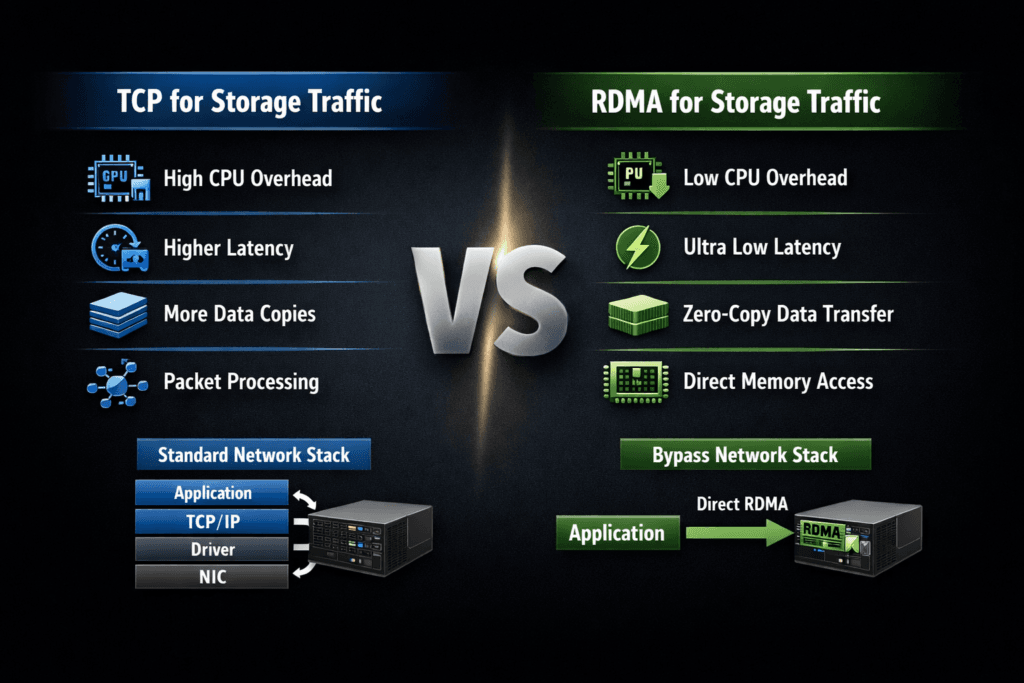
TCP and RDMA represent two different ways to move storage I/O across a network. TCP relies on the standard Ethernet and TCP/IP stack, while RDMA moves data with fewer CPU touches by letting the NIC place data directly in memory. In storage, this choice shows up most often in NVMe-oF designs, especially when teams compare NVMe/TCP against NVMe/RDMA transports such as RoCEv2 or InfiniBand.
Executives usually care about three outcomes: how fast the platform runs, how much CPU it burns per I/O, and how hard it is to operate at scale. DevOps and IT Ops teams add practical concerns like network tuning, observability, failure modes, and day-two troubleshooting.
Operational Considerations When Choosing TCP or RDMA
TCP often wins on rollout speed, hardware choice, and operational familiarity. Most teams already know how to manage routing, security controls, and monitoring for TCP flows. RDMA can deliver tighter latency and better CPU efficiency, but it often demands stricter network behavior and more specialized expertise.
Cost does not come only from adapters and switches. It also comes from engineering time and the blast radius of misconfigurations. RDMA fabrics may require careful tuning for congestion and loss handling, and small mistakes can cause tail latency spikes that look like “storage issues.”
Software-defined Block Storage can reduce that risk because it gives teams a consistent control plane across clusters, nodes, and failure domains. The storage layer can enforce policies, expose telemetry, and maintain guardrails when traffic patterns change.
🚀 Compare NVMe/TCP and RDMA Paths for Storage Traffic
Use simplyblock docs to plan storage networking and reduce CPU overhead in Kubernetes Storage.
👉 Review the simplyblock install and network prep guide →
TCP vs RDMA for Storage Traffic in Kubernetes Storage
Kubernetes Storage adds layers that change how TCP and RDMA behave. Pods share CPU, nodes share NIC queues, and the CSI data path introduces staging and publish steps that influence the I/O path your app sees. A benchmark on a host device rarely matches a benchmark inside a pod hitting a PVC.
What makes RDMA harder in clusters
RDMA can shine for latency, but Kubernetes adds churn. Nodes scale up and down, workloads move, and multi-tenancy becomes the default. If the fabric requires strict tuning, every change request becomes higher risk.
Where TCP fits better
TCP aligns with the way platform teams already run Kubernetes networks. It supports routed designs, and it integrates cleanly with common security and observability tools. For many organizations, NVMe/TCP becomes the baseline tier that can run across baremetal, virtual machines, and mixed clusters.
To keep Kubernetes Storage consistent, teams should treat network transport as part of the storage service, not as an afterthought. That mindset helps when workloads compete and when the platform needs clear isolation.
TCP vs RDMA for Storage Traffic and NVMe/TCP
NVMe/TCP carries NVMe commands over standard Ethernet using TCP/IP. It gives many organizations a SAN alternative that still maps well to cloud-native operations. RDMA-based NVMe-oF transports can reduce CPU overhead and shrink latency, but they typically demand tighter network behavior.
A practical way to frame the decision is “IOPS per core” versus “ops per cluster.” NVMe/TCP often delivers strong performance with simpler operations. RDMA often delivers a lower-latency data path, especially at high I/O rates, but it may require deeper tuning.
SPDK-style user-space I/O stacks also matter here. A user-space, zero-copy design can reduce kernel overhead, which can narrow the CPU-efficiency gap between TCP and RDMA in real deployments. That shift can change the economics of NVMe/TCP in Kubernetes Storage, especially when you scale out.
Measuring TCP vs RDMA for Storage Traffic Performance
Measure what the application feels, not what one device can do. Focus on latency distribution, CPU burn, and behavior under fan-out. Run the test long enough to reach steady state, and repeat it to capture variance.
Use this checklist to keep results comparable across clusters:
- Fix block size, read/write mix, queue depth, runtime, and warm-up time.
- Pin benchmark pods to selected nodes, and reserve CPU to avoid throttling.
- Record the volume mode you use, because raw block and filesystem paths behave differently.
- Capture p95 and p99 latency, not only averages.
- Track CPU per I/O on both clients and storage nodes, plus network drops and retransmits.
The best reports include context. List the transport, the NIC type, the MTU, the congestion settings, and the storage policy. Those details explain why two runs with the same IOPS can behave very differently at p99.
Ways to Improve Latency, CPU Efficiency, and Tail Behavior
Start with the I/O path. Confirm the app uses the intended Kubernetes Storage class and PVC settings, then validate the full path from pod to target. Next, size the CPU and NIC capacity for the transport you pick. NVMe/TCP can hit CPU limits fast if you chase high queue depths without enough cores.
Then address contention. Multi-tenant platforms need QoS, rate limits, and sane placement rules. Without them, one workload can flood queues and force tail spikes for everything else.
Finally, test both hyper-converged and disaggregated storage layouts if your platform supports them. Hyper-converged designs can reduce hops for local reads. Disaggregated designs can improve pool efficiency and simplify upgrades. Each choice changes how you size bandwidth, CPU, and failure domains.
Side-by-Side Transport Comparison for Storage I/O
The table below summarizes how storage teams typically compare TCP and RDMA transports when they plan NVMe-oF for Kubernetes and beyond.
| Category | TCP (NVMe/TCP) | RDMA (NVMe/RDMA, RoCEv2, InfiniBand) |
|---|---|---|
| Primary benefit | Simple operations on standard Ethernet | Lower latency and lower CPU per I/O |
| Main constraint | Higher CPU cost at high IOPS | Fabric tuning and operational complexity |
| Scale pattern | Fits routed, shared networks | Often needs tighter loss and congestion control |
| Troubleshooting | Familiar tooling for most teams | Deeper NIC and fabric expertise |
| Best fit | Broad Kubernetes Storage tiers | Latency-critical tiers with strong network discipline |
Simplyblock™ for Low-Jitter Storage Networking
Simplyblock™ supports NVMe/TCP and RDMA-based NVMe-oF transports, so teams can align the transport to the workload tier without changing the storage control plane. That matters in Kubernetes Storage, where platforms need consistent provisioning, isolation, and day-two operations.
Simplyblock uses an SPDK-based, user-space, zero-copy architecture that targets high IOPS per core and tighter tail latency. That approach helps in NVMe/TCP deployments where the CPU often becomes the real limiter. It also supports multi-tenancy and QoS, so teams can keep noisy-neighbor traffic from turning into storage incidents.
Where Storage Transports Are Headed
Transport decisions increasingly revolve around efficiency. Teams want more I/O per watt, clearer tenant isolation, and stable tail latency during failover and resync. Hardware offload through DPUs and IPUs will matter more as clusters scale, because offload can shift data-path work away from host CPUs.
Expect more mixed tiers in the same environment. Many platforms will run NVMe/TCP as the default tier, and they will reserve RDMA tiers for the strictest latency targets. A storage layer that supports both transports can make that tiering practical in Software-defined Block Storage, without splitting operations into separate stacks.
Related Terms
Teams often review these glossary pages alongside TCP vs RDMA for Storage Traffic.
- NVMe over TCP CPU Overhead
- NVMe-oF Data Path
- SPDK vs Kernel Storage Stack
- NVMe over TCP vs NVMe over RDMA
Questions and Answers
TCP storage uses the kernel TCP/IP stack, so more CPU cycles go into segmentation, checksums, and socket processing before I/O completes. RDMA can bypass much of that path and move data with lower host overhead, which often tightens tail latency at high throughput. The tradeoff is operational: RDMA needs stricter fabric tuning and NIC capabilities. RDMA.
TCP is usually the pragmatic choice when you want fast rollout on standard Ethernet, broad NIC compatibility, and simpler day-2 operations across mixed racks and clouds. With modern NVMe-oF stacks, TCP can deliver strong latency and IOPS, but you’ll hit CPU ceilings sooner than RDMA at very high queue depth and bandwidth. For protocol context, see NVMe over TCP.
RDMA reduces CPU involvement per I/O and avoids parts of the traditional networking stack, so it’s less sensitive to host jitter under load. That can reduce queuing in the host and shorten completion variance, especially for small-block random I/O. However, the latency advantage depends on a well-tuned, low-loss fabric; misconfigurations can erase the gains quickly.
RDMA over Ethernet commonly relies on lossless or near-lossless behavior and careful congestion control, which pushes complexity into switching, QoS, and NIC configuration. If your fabric isn’t engineered for consistent low loss, you may see drops, pauses, or instability that shows up as tail-latency spikes. Protocol variants like RoCEv2 add routing flexibility but still demand disciplined tuning.
Pick TCP when you value operational simplicity, faster adoption, and predictable behavior across heterogeneous networks. Pick RDMA when you need the lowest latency and CPU cost at extreme throughput, and you can commit to fabric engineering and monitoring. A good decision test is: if your workload is p99-sensitive and already CPU-bound on the initiator/target, RDMA is more likely to pay off.