Thin Cloning
Terms related to simplyblock
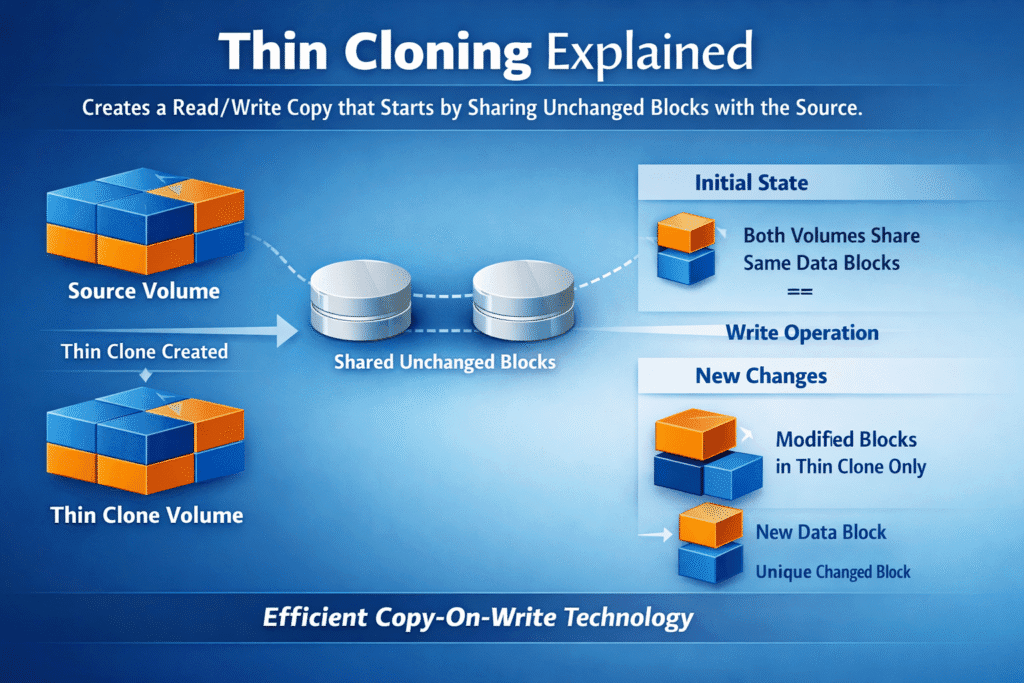
Thin cloning creates a read/write copy that starts by sharing unchanged blocks with the source. The clone stays small at first because it only stores new blocks when writes happen (copy-on-write or redirect-on-write). Teams use thin clones to spin up test, staging, analytics, or rollback paths fast—without paying the time and space cost of a full copy.
How Copy-on-Write Makes Clones “Thin”
Thin clones rely on pointers that reference existing blocks until the workload changes data. When a write arrives, the system writes new blocks for that clone and keeps the source blocks intact. This model makes clone creation fast because the platform mainly updates metadata at the start.
Many platforms also tie a thin clone to a snapshot or an “origin” object. That link matters for cleanup and retention, because shared blocks must stay available while clones still reference them. Good lifecycle rules prevent old clones from pinning storage forever.
🚀 Create Thin Clones for Dev/Test, Natively in Kubernetes
Use Simplyblock to run copy-on-write snapshots and space-efficient clones, so teams can branch data fast without full-copy overhead.
👉 Use Simplyblock for Kubernetes Backup →
Thin Cloning in Kubernetes Storage
Kubernetes makes thin cloning useful for fast dev/test environments, quick rollbacks, and parallel jobs that need the same base dataset. CSI supports volume cloning through a PVC dataSource, and Simplyblock documents this flow for cloning PersistentVolumes. This lets teams create new PVCs quickly without copying full datasets first.
To keep things safe, treat clones as first-class volumes. Apply quotas, QoS, and cleanup rules early, because clone sprawl can fill pools faster than teams expect when many branches start writing. A small policy mistake can turn “thin” into “full” overnight.
NVMe/TCP Considerations for Clone-Heavy Workloads
Clone storms stress the same path as normal I/O: CPU, network, and media queues. NVMe/TCP keeps the data path simple over Ethernet, but thin clones can still push bursty read sharing and sudden write divergence when many clones fork at once. Your network headroom often decides whether clone bursts feel smooth or painful.
Plan for two peaks: the fan-out read peak (many clones read the same base) and the divergence write peak (many clones write new blocks). Good QoS keeps one tenant’s clone burst from dragging down everyone else. Strong monitoring helps you spot when clones shift from “mostly shared” to “mostly unique.”
Benchmarking Thin Cloning at Scale
Benchmarking thin clones means testing more than “clone time.” Many systems create clones almost instantly because they only write metadata at first, and ZFS docs note clones can start nearly instantly and use little space until changes occur. The real cost appears when many clones start writing.
Measure clone fan-out at scale: how fast the system creates 10, 100, or 1,000 clones, and how p95/p99 latency shifts when clones diverge. Track how quickly space grows per clone under realistic write rates, and validate reclaim behavior after deletions. A good test also includes bursty starts, since CI pipelines often create clones in waves.
Practical Ways to Keep Clone Fan-Out Fast
- Cap burst writes per volume, so one clone can’t spike p99 for the pool.
- Spread clones across pools or classes when you expect many branches to diverge.
- Prefer snapshots for “read-only history” and use clones only when you need writable forks.
- Set clear retention rules so old clones don’t pin blocks forever.
- Align I/O sizes with your layout to reduce write amplification when clones diverge.
- Monitor pool free space closely because thin designs can fill fast when many clones write at once.
- Test clone storms in staging so your first “mass clone” event doesn’t happen in production.
Clone Types Compared – Thin Clone vs Full Clone vs Snapshot
This table shows how each option behaves in day-to-day ops. Use it to pick the right tool for dev/test speed, rollback safety, and space growth. The main difference comes down to what stays shared and what becomes unique over time.
| Option | Writable? | Space use at creation | What grows over time | Best for |
|---|---|---|---|---|
| Snapshot | Usually read-only (or controlled RW) | Very low | Grows as source changes | Rollback points, backups |
| Thin clone | Yes | Low | Grows as the clone writes | Dev/test forks, parallel jobs |
| Full clone | Yes | High | Similar to normal volume | Long-lived independent copy |
Predictable Clone Workflows with Simplyblock
Simplyblock supports snapshots and clones with a copy-on-write design, which lets teams create fast, space-efficient copies for Kubernetes volumes. That workflow supports common goals like safe testing, fast rollback paths, and quick environment creation.
For thin cloning, the biggest win comes from control: per-volume limits, clear policies, and repeatable workflows. That mix lets teams spin up many forks without turning storage into a noisy-neighbor problem. When your platform enforces rules, developers can self-serve without risking capacity blowups.
What’s Next for Zero-Copy Cloning
Teams want clones that feel instant, even at a huge scale, plus cleaner cleanup when branches die. More platforms now pair thin cloning with policy engines that automate retention, tier cold blocks, and reduce surprise space growth. Better observability also helps teams forecast when a clone set will “turn heavy” and consume real capacity.
Some systems will push “clone-aware scheduling” next, where the platform places related clones to reduce network reads while still protecting hotspots. Over time, expect more tooling that treats clones like branches, with clear lineage, limits, and safe deletion. That evolution fits thin cloning directly because it targets the two hardest problems: scale and cleanup.
Related Terms
Teams often read these alongside Thin Cloning when they design fast copy workflows and control space growth.
Questions and Answers
Thin cloning creates space-efficient virtual copies of volumes by referencing original data blocks instead of duplicating them. This dramatically lowers capacity usage in software-defined storage environments without sacrificing performance.
Yes, many CSI drivers support thin cloning using snapshots or volume cloning features. It enables fast, low-overhead volume provisioning for Kubernetes stateful applications, such as test environments or dev pipelines.
Thin clones offer near-instant provisioning and minimal storage overhead, while full clones consume more space and take longer to create. For I/O-intensive workloads, thin cloning is ideal when paired with high-performance backends like NVMe/TCP.
Absolutely. Thin cloning paired with NVMe over TCP delivers both performance and efficiency—enabling rapid provisioning of lightweight volumes across distributed Kubernetes environments.
Thin cloning is perfect for test/dev environments, CI/CD pipelines, and data analytics where rapid, space-efficient volume copies are needed. It also helps reduce costs and speeds up provisioning in cloud cost optimization strategies.